
RedThunder One Handed Gaming Keyboard
4.4Editor score
35 anti-ghosting keys
Macro recording support
Portable ergonomic design
Discover the top gaming keypads for 2026. We compare performance, ergonomics, and features to help you choose the perfect one-handed controller for your setup.
Gaming keypads offer a unique advantage by freeing up your mouse hand for precise aiming while consolidating essential commands on your left. These specialized devices range from simple macro pads to advanced analog controllers tailored for competitive play and creative workflows.
We evaluated ten leading models based on switch technology, build quality, customization options, and ergonomic design. Our analysis prioritizes responsiveness, durability, and software flexibility to ensure you find a device that enhances your gaming experience without cluttering your desk.
Each pick highlights specific strengths such as Hall Effect sensors, wireless connectivity, or tactile feedback. Keep in mind that availability and pricing may fluctuate, so verify current details before purchasing to ensure you get the best value for your needs.
4.4Editor score

4.3Editor score

4.3Editor score
This side-by-side comparison outlines the core specifications and unique features of each top-rated keypad. Use this table to quickly identify which model aligns with your preferred switch type, connectivity needs, and ergonomic requirements.




The Razer Tartarus V2 stands out as a top-tier option with its 32 programmable keys and integrated analog thumbpad. Rated highly for comfort, it offers a unique blend of tactile feedback and ergonomic design ideal for long sessions.
We may earn a commission when you buy through this link, at no additional cost to you.
Its mecha-membrane switches provide a mechanical-like feel without the noise, while the thumbpad allows for smooth movement controls. Razer Chroma support ensures deep customization across games and hardware, making it a versatile choice for enthusiasts.
While it lacks wireless connectivity, the wired connection ensures stable performance. The membrane switches may not last as long as mechanical ones, but the comfort factor often outweighs this trade-off for casual to mid-tier gamers.
Buy this if you want a reliable, feature-rich keypad that balances performance and comfort. It is particularly well-suited for MMO players needing many macros and those already invested in the Razer ecosystem.
The 8-way directional thumbpad mimics console controls for natural movement without strain.
Remap any key or combination via Razer Hypershift for complex command execution.
We may earn a commission when you buy through this link, at no additional cost to you.
The Redragon K585 offers exceptional value with a 42-key layout and hot-swappable switches. Its strong rating reflects reliability and customization potential, making it a favorite among budget-conscious gamers seeking flexibility.
We may earn a commission when you buy through this link, at no additional cost to you.
Users can swap switches without soldering to tailor the feel to their main keyboard. The USB pass-through port helps reduce cable clutter by allowing you to connect peripherals directly to the keypad.
While the software is functional, it lacks the polish of premium brands. The wired design limits placement, but the compact footprint and wrist rest ensure comfortable use during intense gaming sessions.
This model is perfect for those wanting a cost-effective entry into one-handed setups. It appeals to players who value hardware customization and need extra macro keys for strategy games.
Accepts most 3-pin or 5-pin switches to match your preferred tactile response.
The USB pass-through allows direct connection for mice or headsets.
We may earn a commission when you buy through this link, at no additional cost to you.
The Redragon K585 PRO brings the K585’s features to a wireless format with robust 2.4GHz connectivity. Its battery life supports all-day use, and the hot-swappable switches remain a key selling point for enthusiasts.
We may earn a commission when you buy through this link, at no additional cost to you.
Wireless freedom lets you place the keypad anywhere without desk clutter. The magnetic wrist rest is easily detachable for cleaning or compact setups. RGB customization ensures it matches your aesthetic perfectly.
Charging is required periodically, which can interrupt long sessions if forgotten. However, the convenience of wireless operation usually justifies the minor inconvenience for most users.
Buy this if you prioritize cable-free setups without sacrificing key count or customization. It is ideal for gamers who want versatility and a cleaner desk environment.
Switch between Bluetooth and 2.4GHz modes for flexible connection options.
Enjoy 15 to 20 hours of continuous play on a single charge.
We may earn a commission when you buy through this link, at no additional cost to you.
The AZERON Cyborg II redefines one-handed gaming with its Hall Effect analog thumbstick and 3D printed ergonomic design. It eliminates drift and supports full analog movement, offering precision unmatched by standard keypads.
We may earn a commission when you buy through this link, at no additional cost to you.
Its adjustable parts ensure a perfect fit for hand sizes ranging from 6.3 to 7.5 inches. The software allows deep customization including diagonal keybinds and analog smoothing for tailored control schemes.
The premium price tag reflects its specialized build and unique features. There is a learning curve to master the analog controls, but competitive players find the investment worthwhile for the edge it provides.
Choose this if you seek top-tier performance and ergonomic customization. It is best suited for serious gamers who need precise analog movement and extensive key mapping options.
Thumbstick supports WASD or 360-degree analog movement without stick drift.
Adjustable parts ensure a perfect fit for various hand sizes and preferences.
We may earn a commission when you buy through this link, at no additional cost to you.
RedThunder One Handed Gaming Keyboard is a compact solution with 35 anti-ghosting keys and a 3ms response time. Its portability and ease of use make it an excellent choice for casual gamers or LAN events.
We may earn a commission when you buy through this link, at no additional cost to you.
The included wrist rest provides ergonomic support despite the small footprint. RGB backlighting adds visual flair with multiple modes, while macro recording allows quick binding of commands via FN keys.
Build quality is functional rather than premium, which keeps costs low. It lacks advanced customization software, but plug-and-play compatibility ensures it works across various systems without hassle.
This keypad is perfect for those seeking affordability and simplicity. Ideal for beginners or anyone needing a travel-friendly device for gaming or basic productivity.
Record macros easily using FN keys for instant command execution.
Small size saves desk space and is easy to carry anywhere.
We may earn a commission when you buy through this link, at no additional cost to you.
The Keychron C0 HE delivers competitive-grade performance with an 8K polling rate and Hall Effect magnetic switches. Its Rapid Trigger technology resets keys instantly on lift-off for precise movement control in fast-paced titles.
We may earn a commission when you buy through this link, at no additional cost to you.
Adjustable actuation points allow fine-tuning to suit playstyles or finger strength. The web-based configurator simplifies setup by removing the need for installed software across Windows and macOS.
While it costs more than budget options, the performance benefits justify it for serious players. The lack of wireless connectivity may limit flexibility, but stability is paramount for competitive use.
Buy this if you compete in FPS games requiring precise timing. It is an excellent choice for players prioritizing responsiveness and software-free customization.
Keys reset instantly on lift-off enabling faster resets and combos.
Modify actuation points for 0.01mm precision to suit your needs.
We may earn a commission when you buy through this link, at no additional cost to you.
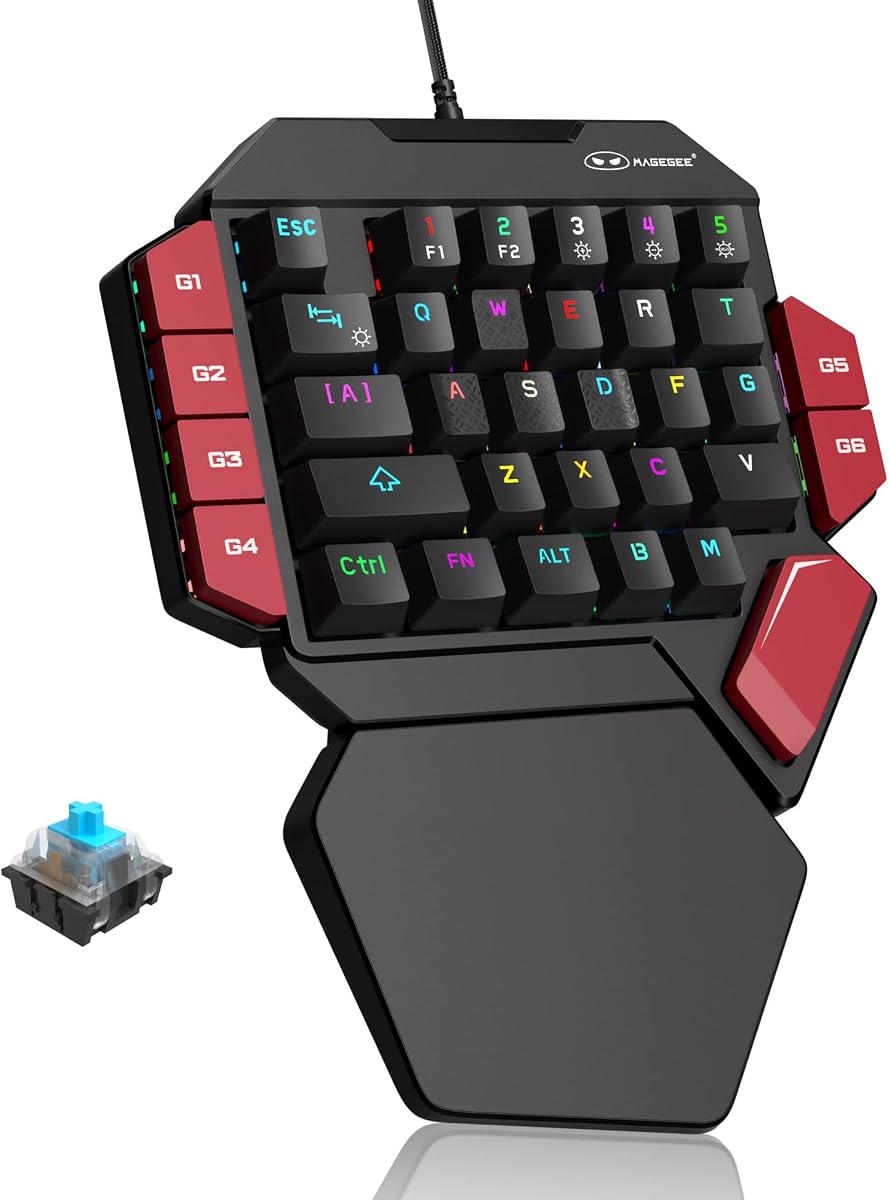
MageGee offers a tactile experience with mechanical blue switches that provide audible feedback. The 35-key layout includes dedicated macro keys and a palm rest to reduce fatigue during extended sessions.
We may earn a commission when you buy through this link, at no additional cost to you.
Its RGB lighting modes are customizable through keyboard shortcuts, avoiding the need for drivers. Plug-and-play compatibility ensures it works across major operating systems without installation hurdles.
The loud clicking may be disruptive in shared spaces but satisfies users who prefer tactile feedback. Limited software customization compared to higher-end models may deter those seeking complex remapping.
This model suits those who want mechanical feel at a budget price. It is ideal for typists and gamers who value tactile clarity over silent operation.
Blue switches provide strong tactile feedback and long service life.
Six dedicated keys allow quick recording and execution of macros.
We may earn a commission when you buy through this link, at no additional cost to you.
The AJAZZ AK029 packs Hall Effect technology into a compact 29-key frame. Its aluminum build and gasket mount design offer stability and durability while saving 60% of desk space.
We may earn a commission when you buy through this link, at no additional cost to you.
The web-based driver makes customization easy without software installation. Adjustable actuation and SOCD support ensure tournament-grade performance for competitive play when paired with a capable PC.
The reduced key count limits complex macro use compared to 42-key models. However, its responsiveness and build quality make it a standout choice for minimalist setups.
Buy this if you prefer a smaller form factor with premium features. It is perfect for FPS players who need speed and durability over extensive key counts.
The 29-key layout frees mouse space for low-sensitivity aiming.
Aluminum plate and gasket mount ensure stable and responsive typing.
We may earn a commission when you buy through this link, at no additional cost to you.
This variant of the Razer Tartarus V2 focuses on the core 32-key layout with mecha-membrane switches. It delivers a reliable and comfortable experience for those familiar with the classic design.
We may earn a commission when you buy through this link, at no additional cost to you.
The thumbpad facilitates movement without leaving the keypad. RGB lighting and programmable keys ensure versatility across games, maintaining Razer’s reputation for build quality and software support.
The higher price point reflects brand value and feature set. Wired connectivity limits placement but ensures consistent input without signal drops or charging worries.
Choose this if you want proven reliability with a familiar layout. It suits users who prioritize comfort and macro utility over cutting-edge sensor tech.
Mecha-membrane switches offer a balance of comfort and tactile response.
Thumbpad provides an ergonomic way to control movement and actions.
We may earn a commission when you buy through this link, at no additional cost to you.
The Redragon RM104 offers versatile connectivity with Bluetooth, 2.4GHz, and USB-C. Its multifunction smart knob allows quick adjustments for volume and lighting, adding convenience to its gaming capabilities.
We may earn a commission when you buy through this link, at no additional cost to you.
With a massive 4000mAh battery, long usage is supported without frequent charging. RGB effects can be synced with other Redragon gear for a unified aesthetic across your setup.
The layout may differ from traditional keypads, so verify key counts match your needs. However, the customization options and wireless modes make it a strong contender for general use.
This device works well for those wanting a multi-purpose wireless controller. It is ideal for users who need flexibility across devices and media functions.
Adjust volume or cycle RGB modes quickly with the multifunction knob.
Switch between Bluetooth and 2.4GHz to fit different setups.
We may earn a commission when you buy through this link, at no additional cost to you.
Selecting the right gaming keypad involves balancing features like switch type, connectivity, and ergonomics. Here are key factors to consider.
Mechanical switches offer tactile feedback while membrane options provide quiet comfort. Hall Effect switches eliminate physical contact for durability and precision.
Choose based on whether you prefer sound and feel or silent and smooth operation.
Wired keypads ensure zero latency, while wireless models reduce desk clutter. Check battery life if choosing wireless to avoid interruptions.
Prioritize wired for competitive play and wireless for clean setups.
Look for wrist rests and adjustable angles to prevent strain. A compact design saves space but must fit your hand comfortably.
Ensure the device supports long sessions without causing fatigue.
Program macros to execute complex commands quickly. Verify software allows save profiles and easy remapping across games.
Select a keypad with robust customization tools for your genre.
Materials like aluminum plates enhance durability and stability. Avoid plastic-heavy builds that might flex under heavy use.
Invest in durable construction to extend the device's lifespan.
RGB lighting lets you match your battlestation's theme. Ensure effects are customizable rather than fixed for better personalization.
Look for systems that sync with other peripherals if needed.
35 to 42 keys offer balance between utility and space. Fewer keys simplify layout while more provide extensive macro capacity.
Choose a layout that covers your most-used commands efficiently.
Budget options provide essential functions while premium models add advanced sensors. Determine which features justify the cost for you.
Aim for the best mix of performance and cost you can afford.
Plug the keypad into your system and install necessary software. Test macros by binding common commands for quick access during games.
Clean keys with compressed air to remove dust and debris. Avoid harsh chemicals that may damage keycaps or lighting.
Update firmware regularly for performance improvements and bug fixes. Store your profiles locally to avoid losing customizations.
Mechanical switches offer distinct tactile feedback and durability. Membrane switches are quieter and softer. Your preference depends on play style and environment noise levels.
Modern wireless technology with 2.4GHz is nearly as fast as wired. For competitive play, ensure the battery is charged and latency is low.
Yes, programming macros for code snippets can boost efficiency. Many models support Windows and macOS for cross-platform utility.
Most models allow a reset via specific key combinations like Fn+Esc. Refer to the manual for exact instructions.
Hall Effect switches use magnetic fields instead of physical contacts. They offer precision and durability without wear or debounce delay.
Most are designed for PC but some support consoles with specific adapters. Check compatibility lists before purchasing for console use.
The Razer Tartarus V2 remains a top choice for overall balance while the Redragon K585 wins on budget value. Premium users may prefer the AZERON for its advanced analog controls.
Prioritize ergonomics and switch type based on your play style. Comfort during long sessions and input accuracy are more critical than extra features.
Check current pricing and availability before purchasing to ensure you get the best deal. Verify compatibility with your system for a smooth setup experience.