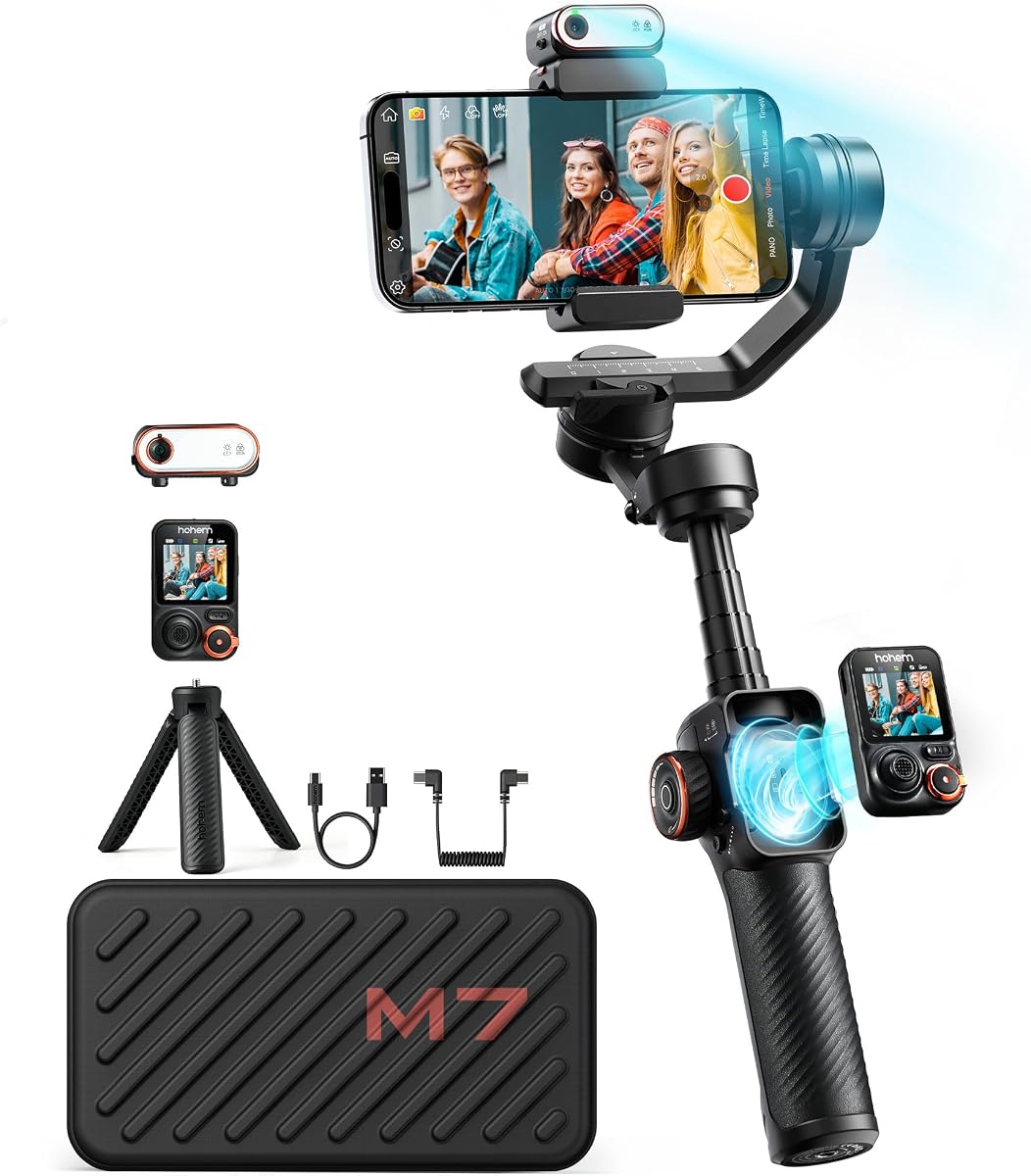
hohem iSteady M7
4.3Editor score
Detachable touchscreen remote
AI tracker and fill light
12 hour battery life
Explore the top 10 gimbals for the Galaxy S26 Ultra, comparing stabilization, battery life, and features to help you capture smooth footage today.
Capturing smooth video with the Galaxy S26 Ultra requires reliable stabilization. A good gimbal locks your phone steady while you walk, run, or move freely. This ensures your footage stays cinematic and professional no matter where you film.
We compared ten leading gimbals based on stabilization tech, battery capacity, and mobile app features. Our analysis covers compatibility with large phones like the S26 Ultra and ease of use for creators at any skill level.
Each pick shows key strengths and ideal use cases so you can choose wisely. Prices fluctuate often on Amazon so verify current costs before purchasing. These models represent the best options available in the current market landscape.
4.3Editor score

4.5Editor score

4.1Editor score
This table shows all ten models side by side so you can compare their key features and decide which fits your needs best.




The DJI Osmo Mobile 7 is a standout gimbal for the Galaxy S26 Ultra and other large smartphones. It delivers stable footage with active tracking and a 10 hour battery life making it ideal for long shoots.
We may earn a commission when you buy through this link, at no additional cost to you.
Its ActiveTrack 7.0 uses dual lens enhanced tracking to keep subjects sharp even during fast movement. The foldable design and ergonomic grip make it easy to carry and use comfortably for extended periods.
One trade off is that the DJI Mimo app is no longer on Google Play so you must download it from the official website. This adds a small setup step but the app itself is powerful once installed.
This gimbal is perfect for creators who want reliable stability and intuitive controls without a steep learning curve. It balances features, portability, and ease of use better than most models in this price range.
The dual lens system enables precise tracking even when your subject moves quickly or changes position unexpectedly during filming.
With up to 10 hours of operation and reverse charging you can film all day without worrying about running out of power.
We may earn a commission when you buy through this link, at no additional cost to you.
The hohem iSteady X3 SE stands out with its detachable magnetic remote that lets you control shots from up to 32 feet away. It is lightweight and folds down for travel with up to 11 hours of battery life.
We may earn a commission when you buy through this link, at no additional cost to you.
iSteady 8.0 provides smooth 3 axis stabilization suitable for jogging or dynamic action. The Hohem Joy app offers gesture control and creative templates that simplify filming for vloggers and solo creators.
While the remote is handy it may lose connection in crowded indoor spaces with high Wi Fi interference. Also the app has fewer advanced features than DJI models but it remains easy to use.
Choose this if you want an affordable gimbal with a remote for self filming or group shots. It is great for beginners who need reliable stabilization without spending too much.
The magnetic remote connects wirelessly allowing you to start stop recording and change modes without touching the phone or gimbal.
Charge once for all day use so you never miss a moment during travel or long outdoor events.
We may earn a commission when you buy through this link, at no additional cost to you.
The DJI Osmo Mobile 8 combines tracking audio and lighting in one package so you get more control over your shots. It includes a built in tripod and extension rod for versatile framing without extra gear.
We may earn a commission when you buy through this link, at no additional cost to you.
With seamless 360 pan rotation and intelligent tracking it follows subjects smoothly while the magnetic clamp makes mounting fast and secure. The ergonomic grip helps you hold it steady for long periods.
The main downside is the price compared to basic models and the DJI Mimo app must be downloaded from DJI since it is not on Google Play. This setup is minor but worth noting before buying.
If you need audio and lighting features directly on the gimbal this is the ideal choice for vlogging and event coverage. It offers excellent stability and flexibility for creators who want an all-in-one solution.
Integrated modules let you capture clear sound and adjust lighting without needing separate accessories or adapters.
A built in extension rod and tripod let you capture wide group shots or hands-free videos anywhere.
We may earn a commission when you buy through this link, at no additional cost to you.
The hohem iSteady V3 Ultra features a detachable 1.22 inch touchscreen remote that gives you full control from up to 33 feet away. It has a built in fill light and extension rod for flexible creative shots.
We may earn a commission when you buy through this link, at no additional cost to you.
iSteady 9.0 keeps footage buttery smooth even during vigorous movement while the smart motion detection tracks faces pets and objects reliably. The app offers intelligent templates that simplify editing and production.
The battery life at 9 hours is slightly lower than some rivals but still enough for most events. The remote is handy but range may shrink in areas with strong wireless interference.
This is a great pick for creators who want a touchscreen remote and lighting controls in one device. It balances features and affordability making it strong for solo filming and lifestyle content.
The 1.22 inch remote lets you preview shots adjust settings and trigger recording without touching your phone.
Adjust brightness and color temperature remotely to get perfect lighting for beauty tutorials or night shoots.
We may earn a commission when you buy through this link, at no additional cost to you.
The AOCHUAN Smart XE offers impressive features at a budget price making it accessible for new creators. It folds down small and includes AI face tracking plus a one click video button for quick mode switching.
We may earn a commission when you buy through this link, at no additional cost to you.
Its 3 axis stabilization works well for walking and light movement with a focus wheel that gives manual control like a pro camera. The app supports basic modes like time lapse and motion lap.
The plastic build feels less sturdy than premium models and the app lacks some advanced templates found in other brands. However it provides solid value for the price and performs reliably for short clips.
Choose this if you are on a tight budget but still want AI tracking and a long battery. It is perfect for TikTokers and hobbyists who want a simple foldable gimbal.
Switch between horizontal and vertical modes with a single tap for fast TikTok or YouTube Shorts creation.
The app tracks faces automatically keeping you centered in the frame without manual adjustments.
We may earn a commission when you buy through this link, at no additional cost to you.
The DJI Osmo Mobile 7P comes with a multifunctional module that supports DJI Mic 2 Mini reception and adds lighting to your setup. It delivers seamless 3 axis stabilization and ActiveTrack 7.0 for sharp tracking of moving subjects.
We may earn a commission when you buy through this link, at no additional cost to you.
The module combines mic receiver and lighting into one compact unit so you do not need separate accessories for audio and lighting. The magnetic clamp and extension rod make it easy to set up and film hands free.
The module adds weight compared to the standard 7 and may reduce battery life slightly when in use. Also you still need to download the DJI Mimo app separately since it is not on Google Play.
If you use a DJI Mic or want built in lighting and audio this model is the clear choice for podcasting and interviews. It offers a true all-in-one solution for professional content creators.
The module acts as a receiver for DJI Mic 2 or Mini so you can capture clear audio wirelessly while filming.
Integrated lighting helps illuminate your face or subject without needing a separate LED panel.
We may earn a commission when you buy through this link, at no additional cost to you.
The hohem iSteady Mobile Plus stands out with an ultra wide angle mode that prevents motor interference from blocking the lens. It offers up to 13 hours of battery life and an Inception mode for creative 360 rotation shots.
We may earn a commission when you buy through this link, at no additional cost to you.
Its iSteady 7.0 stabilization delivers cinematic smooth footage even on larger phones like the S26 Ultra. The Hohem Joy app supports templates like clone me dolly zoom and panoramic video with one tap.
Motor interference may still occur on some phone models so you might need to test positioning or use a wider angle lens. The app is functional but feels less polished compared to newer competitors.
Choose this if you want long battery life and unique creative modes like auto rotation for storytelling. It is strong for travel recording and short video creation where endurance matters most.
Press the four trigger to activate a wider view that keeps motors out of the camera frame.
Shoot all day without recharging and use the gimbal to charge your phone when needed.
We may earn a commission when you buy through this link, at no additional cost to you.
The Hohem iSteady M6 Kit features an OLED display that shows battery status and settings at a glance. It includes a magnetic fill light with RGB and warm tones plus AI tracking that works across all apps.
We may earn a commission when you buy through this link, at no additional cost to you.
With iSteady 7.0 stabilization and a control wheel you can adjust focus and light temperature on the fly. The heavy payload supports most phones and accessories making it flexible for setups with mics or lenses.
The OLED display is useful but adds power draw so battery life may be shorter than models without it. Also the unit is heavier than compact gimbals which may cause fatigue during handheld use.
Select this if you need to see real-time status and control lighting without opening the app. It suits creators who want customization and accessory support in a single gimbal package.
The OLED screen shows battery and mode info instantly so you never miss a setting while shooting.
Switch between cool warm and RGB lights with a control wheel to match any scene or mood.
We may earn a commission when you buy through this link, at no additional cost to you.
The Hohem iSteady M7 supports up to 500g payload and includes three 1/4 inch expansion ports for mics and lenses. It comes with a detachable 1.4 inch touchscreen remote and magnetic AI tracker that locks onto targets tightly.
We may earn a commission when you buy through this link, at no additional cost to you.
The RGB fill light and extension rod let you shoot in any environment with controlled lighting and flexible framing. Its tracking works directly with your camera app so you do not need to open the Hohem Joy app.
The price is higher than most models which may not suit budget buyers. Also the remote range is limited to 10 meters so it may not work well for large outdoor spaces or distant shots.
Choose this if you need maximum payload and accessory options with touchscreen control. It is ideal for pros who want to add external gear and still get reliable tracking and lighting.
Support phones up to 500g and add mics or lenses using three expansion ports without losing balance.
Select targets and monitor footage directly on the 1.4 inch remote screen for instant control.
We may earn a commission when you buy through this link, at no additional cost to you.
The hohem iSteady M7 offers a detachable 1.4 inch touchscreen remote and powerful AI tracking with 100 percent resolution boost. It delivers up to 12 hours of battery life and reverse charging to keep your phone powered while filming.
We may earn a commission when you buy through this link, at no additional cost to you.
Its 360 RGB lighting lets you set custom colors and brightness for cinematic scenes. The built-in aluminum rod extends to 7.6 inches for creative high and low angles without extra gear.
The price is on the high side compared to most models which may limit appeal for hobbyists. Also the remote may lose signal beyond 10 meters so use it within line of sight for best results.
This is the pick for pros who want maximum control and lighting options in one package. It balances endurance and versatility making it the strongest premium choice on this list.
Set any color or brightness to match your scene or create mood lighting for cinematic shots.
Shoot all day and charge your phone from the gimbal so you never run out of power on set.
We may earn a commission when you buy through this link, at no additional cost to you.
Selecting the right gimbal depends on your budget shooting style and needed features. These factors will help you find a model that works smoothly with your Galaxy S26 Ultra.
Look for 3-axis stabilization to cancel motion across pitch yaw and roll axes. Models with AI tracking like ActiveTrack 7.0 or iSteady 9.0 keep subjects in focus even when moving.
Choose a gimbal with at least 10 hours of operation to cover long sessions. Reverse charging is a bonus that lets you power your phone while filming.
Ensure the gimbal supports phones up to 400 grams or more since the S26 Ultra is heavy with a large battery. Higher payload means better torque and less motor strain.
Magnetic clamps are quick to use but may slip with thick cases. Standard screw clamps are safer but slower to mount so weigh speed against security.
Check if the companion app supports your OS and camera features. Touchscreen remotes let you control shots hands-free which helps with solo or group filming.
Foldable designs save space in bags. A lightweight gimbal reduces hand fatigue and makes it easier to carry everywhere you go.
Built-in fill lights and mic receivers reduce the need for separate gear. This simplifies your setup and improves video quality in low light.
Budget models under 60 provide basic stability while premium models over 150 offer more features. Match the price to your actual needs to get the best value.
Balance your phone on the gimbal before powering on. Most models use magnetic or screw clamps to hold your Galaxy S26 Ultra securely in place.
Power on the gimbal and connect it to your phone through the companion app. Calibrate the device if prompted to ensure accurate tracking and smooth stabilization.
After use wipe down the gimbal with a soft dry cloth and store it in a padded case to avoid damage during transport.
Yes but thick protective cases may prevent magnetic clamps from holding securely. For best results use a slim case or remove it when attaching the phone to the gimbal.
Most gimbals work without an app for basic stabilization but advanced features like tracking and editing require the companion app. Some models let you track directly through your phone camera.
With regular use and proper care a quality gimbal can last several years. Motor durability depends on how often you use it and whether you store it correctly between sessions.
Look for at least 10 hours of runtime to cover full shooting days. Models offering reverse charging are ideal because they can also power your phone while filming.
Yes most gimbals support time-lapse and motion-lapse modes through their apps. These modes automate camera movement to create cinematic effects without manual control.
Magnetic clamps are faster to attach and remove but may not hold thick cases well. Screw clamps are more secure but slower to mount so choose based on your needs.
We reviewed ten top gimbals that support the Galaxy S26 Ultra with stabilization tracking and long battery life. DJI Osmo Mobile 7P leads as Editor's Choice while hohem iSteady M7 offers premium features and AOCHUAN Smart XE brings budget value.
Prioritize stabilization quality battery life and compatibility if you shoot daily. Extra features like remotes and lighting add value but may raise the price depending on your goals.
Check current prices on Amazon before buying since costs change often. Use these options to capture smooth pro-quality footage that highlights the power of your Galaxy S26 Ultra camera.