
Cable Matters 2-Pack 6-Pin to 8-Pin PCIe GPU Power Adapter Cable
4.7Editor score
Compact 4-inch cable length
Secure locking latch design
Two adapters included in pack
This guide compares the top GPU power adapters for 2026, covering 12VHPWR, 6-pin, and 8-pin options for safe and efficient graphics card power delivery.
Choosing the right GPU power adapter is critical for system stability and hardware safety. Whether you are upgrading to a new graphics card or managing cable clutter, the correct adapter ensures reliable power delivery without risking damage to expensive components.
We evaluated ten top-rated GPU power adapters based on build quality, electrical specs, and user feedback. This list covers essential options ranging from budget-friendly PCIe converters to high-wattage 12VHPWR extension cables for modern high-performance systems.
Each pick highlights specific strengths like connector type, wire gauge, and cable length. Prices and availability change frequently, so always verify current listings before purchasing. Use this guide to find the perfect adapter for your specific GPU and power supply configuration.
4.7Editor score

4.7Editor score

4.2Editor score
This side-by-side comparison highlights key specifications for every adapter on our list. Use these details to match the connector type, power rating, and cable length to your specific graphics card and power supply requirements.


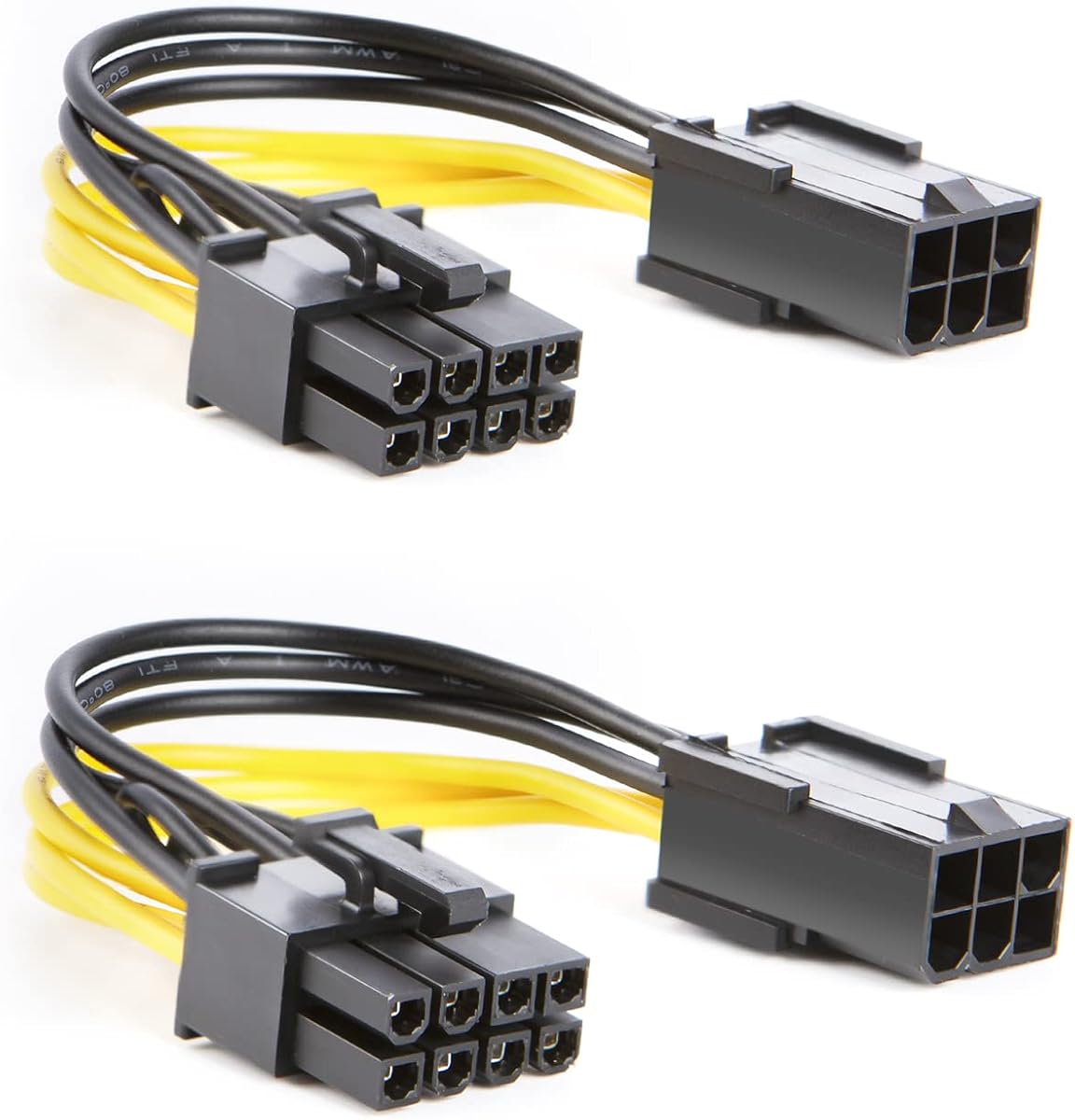


The Cable Matters 2-Pack Adapter offers a simple solution for converting 6-pin to 8-pin connections. Rated 4.7 stars, it provides essential connectivity for mid-range graphics cards without breaking the budget.
We may earn a commission when you buy through this link, at no additional cost to you.
Its compact 4-inch design fits tight spaces, while the locking latch prevents accidental disconnections. The keyed housing ensures proper alignment, making installation straightforward and secure.
The main trade-off is the short length, which may not suit cases where the PSU is far from the GPU. It also lacks high-wattage support, so verify your power needs before use.
This adapter is ideal for users upgrading to a GPU with a higher power requirement than their PSU supports via 6-pin alone. Choose this for cost-effective and reliable connectivity.
The 4-inch length ensures the cable does not obstruct airflow or other components in smaller cases.
A locking latch on the 8-pin male connector helps prevent accidental disconnection during system use.
We may earn a commission when you buy through this link, at no additional cost to you.
This adapter is the Editor's Choice for modern high-performance GPUs. With a 4.7 rating, it solves common cable strain issues with its right-angle 16pin connector and 13-inch length.
We may earn a commission when you buy through this link, at no additional cost to you.
The 16AWG tinned copper wire ensures stable voltage transmission, while the flexible protective sleeve prevents kinking. It supports up to 400W peak power, suitable for RTX 4070 and 5070 Ti cards.
It is not compatible with 12pin connectors like the RTX 3090, so checking your GPU model is essential. The premium price reflects the higher quality materials and specific design.
Buy this adapter if you need reliable power delivery for an RTX 40 series GPU and want to avoid cable stress. It offers the best balance of performance and design.
The 90-degree design reduces physical strain on the 16-pin port and improves cable routing in tight cases.
Alloy copper and tinned material in plug terminals provide higher current stability and prevent overheating.
We may earn a commission when you buy through this link, at no additional cost to you.
The NZXT adapter delivers up to 600 watts of power, making it suitable for high-end NVIDIA 40 Series GPUs. It has a 4.2 rating and replaces bulky factory adapters with a more compact design.
We may earn a commission when you buy through this link, at no additional cost to you.
It is specifically rated for use with all NZXT C-Series Gold ATX 2.X PSUs, ensuring seamless integration. The dual 8-pin PCIe connectors on one end connect directly to the power supply unit.
The lower rating suggests some users may have encountered issues with fit or quality. It is best for those already in the NZXT ecosystem where guaranteed compatibility is a priority.
Choose this if you have a matching NZXT PSU and need a high-wattage adapter. It offers premium performance for systems that demand maximum power stability.
With a 600W rating, this adapter supports the power demands of top-tier graphics cards without compromise.
Replaces standard bulky adapters with a slimmer profile that improves airflow and aesthetics in the case.
We may earn a commission when you buy through this link, at no additional cost to you.
The Fasgear adapter supports up to 600W output and features 16AWG tinned copper wire for stable transmission. It has a 4.5 rating and is designed for GPUs like the RTX 4090 and 5070 Ti.
We may earn a commission when you buy through this link, at no additional cost to you.
It includes transparent cable comb acrylic clips for neat cable management. The 30cm length extends reach significantly compared to standard factory cables, reducing strain on ports.
Ensure your PSU has two unoccupied 8-pin PCIe ports for this adapter to function correctly. Some models may require multiple adapters for high-power setups, adding to complexity.
This is a strong choice for users needing longer cables and higher wattage capacity. It balances performance with practical design for modern PC builds.
Included clips help route the extension cable cleanly to avoid clutter and maintain airflow in the case.
Tinned copper prevents oxidation and ensures stable high-current performance over extended periods of use.
We may earn a commission when you buy through this link, at no additional cost to you.
This extension cable converts a PSU native 12VHPWR output to a dual 8-pin format for compatible GPUs. It has a 4.4 rating and is only 6.8 inches long, making it compact and simple.
We may earn a commission when you buy through this link, at no additional cost to you.
It works with select Corsair and Seasonic ATX 3.0 and 3.1 PSUs that feature native 12VHPWR outputs. The 16AWG copper wire supports up to 600W output for stable power transmission.
Check that your GPU uses a male 8-pin or 6-pin connector, as this is not compatible with 12+4 pin cards like the RTX 4070 TI. Its short length may not reach in larger cases.
Choose this if you have a modern PSU with 12VHPWR output and a GPU that accepts dual 8-pin connectors. It is a practical and cost-effective conversion solution.
This cable allows users with ATX 3.0 PSUs to use native power outputs without needing multiple separate adapters.
With 16AWG copper wire, it ensures stable voltage transmission and supports up to 600W power output.
We may earn a commission when you buy through this link, at no additional cost to you.
This extension cable is designed for GeForce RTX 4070 series GPUs with 16-pin connectors. It has a 4.5 rating and offers 13 inches of length to reach tight or crowded areas.
We may earn a commission when you buy through this link, at no additional cost to you.
The high-density flexible protective sleeve prevents kinking and ensures stable voltage transmission. It supports up to 450W peak power, making it suitable for mid-to-high range RTX cards.
It is not compatible with 12pin GPUs like the RTX 3090. The included cable comb clips help keep the system looking clean, but users may need to route carefully.
Buy this if you have an RTX 40 series card and need more reach. It offers good balance of performance and flexibility.
The nylon braided fiber and flexible sleeve prevent kinking and protect wires during installation and use.
16AWG tinned copper wire ensures stable voltage transmission and reliable performance for demanding GPUs.
We may earn a commission when you buy through this link, at no additional cost to you.
The CableCreation adapter converts 6-pin to 8-pin for GPU cards needing more power. With a 4.7 rating, it supports max 36W and includes two adapters in the pack.
We may earn a commission when you buy through this link, at no additional cost to you.
It uses 18AWG pure copper for safe performance and is RoHS certified. This eliminates the need to upgrade the PSU for compatibility with newer video cards.
The short 4-inch length may limit placement options. It is best suited for systems with short distances between PSU and GPU connections.
Choose this if you need a low-cost and safe solution for PCIe power needs. It offers reliable performance for standard GPU power requirements.
This adapter eliminates the expense of upgrading a power supply just to achieve compatibility with a new GPU.
RoHS certification ensures the product meets safety standards for harmful substances and environmental safety.
We may earn a commission when you buy through this link, at no additional cost to you.
Corsair adapter features a 180° bend for tight cable routing on RTX 40 Series GPUs. It has a 3.9 rating and focuses on preventing power cables from pressing against case side panels.
We may earn a commission when you buy through this link, at no additional cost to you.
Withstanding temperatures up to 105°C ensures reliability even with high-power GPUs. The design allows for cleaner builds without physical stress on components.
It is only compatible with PCIe 5.0 12VHPWR GPUs. The lower rating suggests some users may have concerns about fit or performance compared to other options.
Choose this if you have a specific case routing need or want to protect the GPU port from stress. It offers unique thermal protection for power-hungry cards.
The 180° bend prevents cables from pressing against side panels, improving airflow and aesthetics inside the case.
Capable of withstanding temperatures up to 105°C, ensuring reliable use with high-performance graphics cards.
We may earn a commission when you buy through this link, at no additional cost to you.
EVGA PowerLink improves cable management and supports a variety of PCI-E connections with adjustable spacing. It has a 4.4 rating and includes integrated solid state capacitors for power filtering.
We may earn a commission when you buy through this link, at no additional cost to you.
It is designed for specific NVIDIA Founders Edition and EVGA GeForce RTX models like the 2080 Ti and 1080. The adjustable spacing makes it easier to route cables cleanly in a system.
Compatibility is limited to older GPUs and specific EVGA models. Newer 12VHPWR systems may not benefit from this adapter.
Choose this if you are upgrading or building with compatible EVGA or NVIDIA Founders Edition cards. It offers easy installation and improved cable organization.
Integrated solid-state capacitors filter power to ensure cleaner and more stable delivery to the graphics card.
Adjustable connector spacing allows for flexible cable routing to minimize clutter and maximize case aesthetics.
We may earn a commission when you buy through this link, at no additional cost to you.
This adapter delivers up to 600W with a 16-pin to three ATX 8-pin configuration. It has a perfect 5.0 rating and features a 90-degree angled connector for clean cable routing.
We may earn a commission when you buy through this link, at no additional cost to you.
It is available in Type A or B layouts to accommodate different chassis configurations. The aluminum alloy construction ensures robust operation and sustained high-performance delivery.
This adapter requires specific modular PSU setups. Users should verify their PSU compatibility and GPU power requirements before purchasing.
Choose this if you need high-wattage modular power for next-generation GPUs. It offers excellent performance and clean system aesthetics.
Aluminum alloy construction ensures sustained high-performance operation and durability over long-term use.
Offered in Type A or B layouts, this adapter accommodates various chassis and motherboard configurations for flexible installation.
We may earn a commission when you buy through this link, at no additional cost to you.
Selecting the right adapter requires understanding your GPU power requirements and PSU capabilities. Use these factors to ensure safe and stable system performance.
Verify your GPU connector type (e.g., 6-pin, 8-pin, 12VHPWR) and PSU output connectors. Using the wrong adapter can prevent boot or damage components.
Match the connector type exactly to avoid power delivery issues or physical fitting problems during installation.
Check the adapter's wattage rating against your GPU power needs. High-performance GPUs often require 600W support, while others need 300W to 400W.
Choose an adapter rated for the peak power required by your specific GPU to prevent instability or damage.
Measure the distance between your PSU and GPU ports. Shorter adapters (4 inches) suit compact cases, while longer ones (13+ inches) help with tight or large builds.
Select a length that reaches without excessive tension or slack to ensure clean cable management and airflow.
Higher quality adapters use 16AWG wire instead of 18AWG. Thicker wire supports higher current and reduces resistance and heat buildup.
Opt for adapters with 16AWG tinned copper for stable voltage transmission and improved reliability under load.
Look for features like nylon braiding, alloy terminals, and locking latches. These elements prevent kinking, improve connection security, and reduce overheating.
High-quality materials ensure the adapter withstands physical stress and heat generated during long gaming or rendering sessions.
Confirm the adapter lists compatibility with your specific GPU model. Some adapters are designed only for 12VHPWR or specific ATX 3.0 PSU standards.
Always check the product description to ensure your GPU and PSU are explicitly listed as supported.
Adapters with included clips or flexible sleeves help route cables neatly. Proper management reduces clutter and improves airflow within the case.
Choose options that allow you to route cables cleanly to maintain system aesthetics and cooling efficiency.
Look for adapters that are RoHS certified. This ensures the product meets safety standards and does not contain harmful substances.
Certified adapters offer safer operation and compliance with environmental and electrical safety regulations.
Always power down your system and unplug it from the wall before installing any adapter. Remove the side panel of your case to access the PSU and GPU power ports.
Connect the adapter firmly to the PSU and GPU ports until you hear a click if available. Ensure there is no loose tension on the cable that could cause disconnection or stress.
Avoid bending the adapter sharply at a 90-degree angle if possible. Regularly inspect cables for signs of wear, heat damage, or loose connections to maintain system safety.
Not recommended. Most high-end GPUs require specific power connectors and higher wattage. A 6-pin to 8-pin adapter does not increase the PSU wattage and may not provide enough power or stable current for demanding cards.
Yes, if they are rated for 600W or compatible with the specific GPU. Always verify the adapter supports your exact model and follows ATX 3.0 standards to ensure safe power delivery.
While length itself does not change power, longer cables introduce more resistance. Use thicker gauge wires like 16AWG for longer cables to maintain voltage stability and reduce potential heat issues.
Check your power supply manual or label. Common connectors are 6-pin, 8-pin, 6+2-pin, and 12VHPWR. Verify the type before purchasing an adapter to ensure physical compatibility.
Type A and B refer to the layout of the 4-pin connector on the 12VHPWR adapter. The difference is internal pin orientation, so choose the type matching your PSU to ensure correct contact.
Yes, but ensure each connects to separate PSU rails and meets the power requirements. This is common for high-wattage GPUs, but check GPU guidelines to avoid overloading a single PSU connector.
Feel the adapter for excessive heat or listen for buzzing sounds. Discoloration or melting near the connectors also indicates issues. Stop using it immediately if you notice any signs of overheating.
Branded adapters often use better materials like tinned copper and include better safety features. While more expensive, they provide higher reliability and safety for your GPU and PSU investment.
Our top picks include the Cable Matters 2-Pack for budget options, the 16Pin GPU RTX Adapter for overall performance, and the NZXT 12VHPWR Adapter for premium users.
Prioritize wire gauge, power rating, and connector compatibility to ensure safe and stable operation. A proper adapter protects your expensive components from power instability.
Always check current prices and compatibility details before buying. Verify your PSU and GPU model to ensure the selected adapter meets your system requirements.