
Cable Matters 3-Pack 15-Pin SATA Power Extension Cable, 12 inches
4.7Editor score
Reliable power extension
Clean internal cable management
Cost-effective 3 pack
This guide compares the top hard drive power cables for SATA and Molex connections to ensure reliable data storage and system performance.
Finding the right hard drive power cables is essential for maintaining stable system performance and protecting your valuable data. Whether you are upgrading an older computer or building a new workstation, the quality of power delivery matters greatly for your storage devices.
We have evaluated ten top-rated power cables based on compatibility, build quality, and user feedback. Our analysis covers splitters, extensions, and legacy adapters to help you find the perfect fit for your specific power supply needs.
Each pick highlights key strengths and potential limitations to guide your decision. Please note that prices and availability change frequently, so verify current details before purchasing your next cable solution for your setup.
4.7Editor score

4.8Editor score

4.7Editor score
The following comparison table provides a side-by-side overview of the ten selected hard drive power cables. We highlight key specifications and features to help you quickly identify the best option for your specific system requirements and expansion plans.



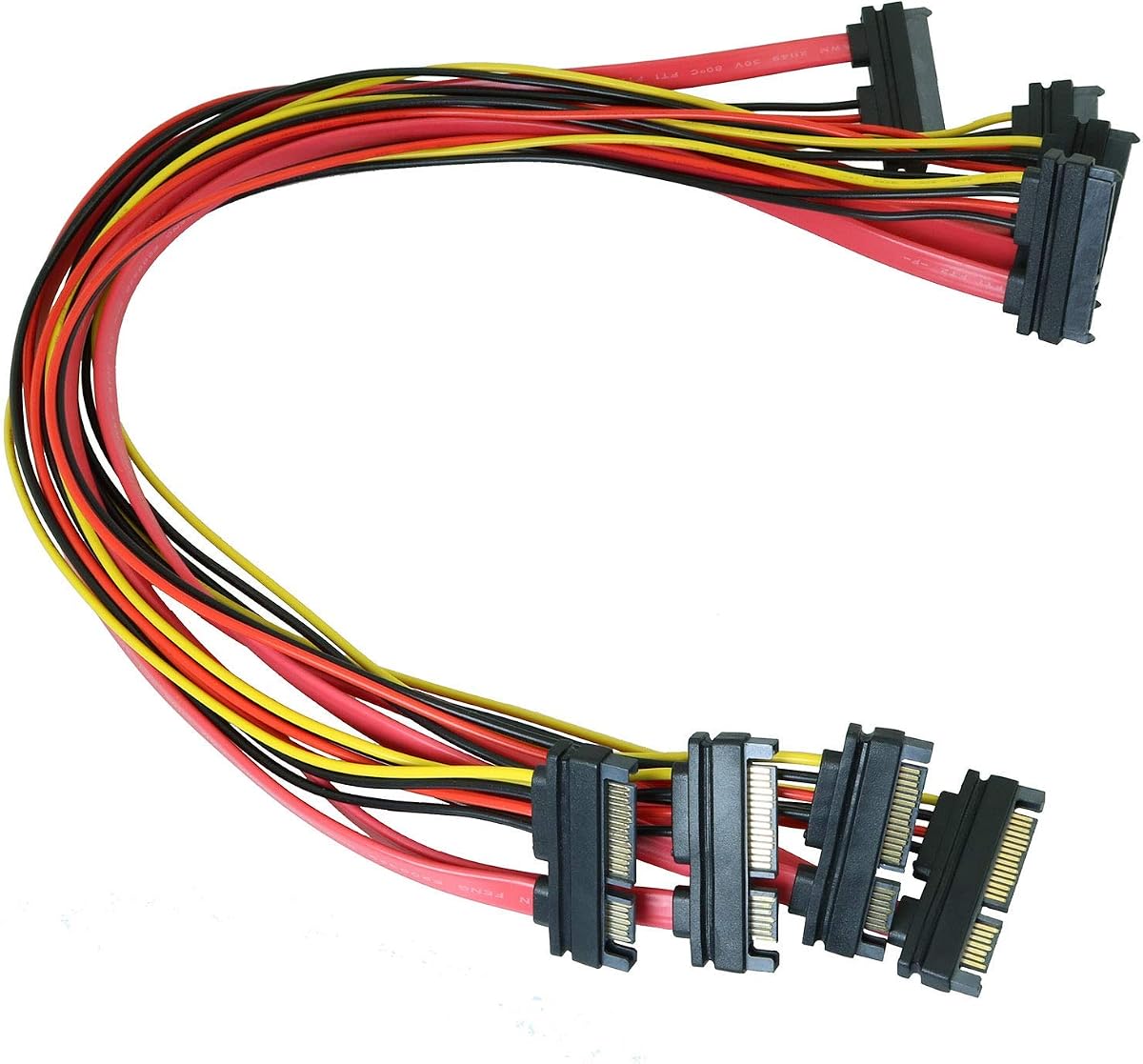

This high-quality cable is designed to split one 15 Pin SATA connector into six separate SATA power connectors, allowing you to easily connect multiple HDD, SSD, and Optical Drives to your system. With a rating of 4.7, it stands out for its ability to power up to 6 devices simultaneously, making it ideal for expansive storage builds.
We may earn a commission when you buy through this link, at no additional cost to you.
Its wide compatibility ensures it works with various devices such as HDD, SSD, and Optical Drives, whether you need to power up your storage drives or optical devices. The reliable performance ensures stable power transmission, preventing any interruption in the performance of your connected devices and effectively delivering power to each individual unit for optimal functionality.
While the 6-way split is powerful, it may be bulkier than simpler 2-way options, potentially requiring more careful cable management inside smaller cases. However, the easy installation allows for quick setup without additional tools or expertise, simply connecting the 15 Pin SATA end to your power supply and plugging in the six SATA connectors to your devices.
If you need to maximize the number of drives your PSU can support without buying a new unit, this cable is a strong candidate. Its durable construction made with high-quality materials ensures long-lasting durability, making it a reliable choice for your power supply needs and a smart investment for storage expansion.
Split one connector into six to power extensive storage arrays from a single PSU port.
Reliable transmission prevents interruptions and ensures optimal functionality for every connected device.
We may earn a commission when you buy through this link, at no additional cost to you.
This complete 4-Pack SATA III Cable Kit offers both data and power solutions, featuring premium copper wire conductors that deliver stable signal transmission. With a rating of 4.7, it supports up to 6Gbps transfer speeds, which is twice as fast as SATA II, making it ideal for high-speed data transfers and efficient system builds.
We may earn a commission when you buy through this link, at no additional cost to you.
The kit includes dual power splitter adapters that fit legacy and new PC power supplies, ensuring broad compatibility across different system generations. Latching lock connectors on both ends lock tightly to prevent loose disconnection and ensure reliable plug-and-play file transfer, while the mix of straight and 90-degree right-angle data cables helps tidy wiring in small form factor PC cases.
Some users might find that not all adapters are needed for a single build, but the extra components provide excellent value for future upgrades or multi-system setups. The eco-friendly durable material ensures long-term reliability, and the comprehensive nature of the kit means you have everything required for PC upgrades and new computer storage expansion builds in one purchase.
This is an excellent choice for builders who want a one-stop solution for both data connectivity and power splitting needs. The combination of speed, flexibility in cable angles, and included splitters makes it a versatile option for anyone looking to upgrade their storage infrastructure without hunting for separate components.
Supports SATA III 6Gbps speeds for blazing-fast file transfers between drives and system.
Includes data and power cables plus adapters for a complete connection solution.
We may earn a commission when you buy through this link, at no additional cost to you.
This flexible SATA power cable connects modern Serial ATA HDDs and optical drives to legacy power supplies with 4 pin Molex LP4 ports. Rated at 4.7, it provides a reliable solution for upgrading older PC systems without needing to replace the entire power supply unit, maintaining stable SATA power delivery for your hardware.
We may earn a commission when you buy through this link, at no additional cost to you.
The 6 inch SATA power cable design provides the ideal length for internal routing, reducing clutter inside PC cases while ensuring efficient connection between SATA devices and Molex-based power supply units. As a cost-effective 3 pack set, it includes three adapter cables, providing spare or replacement options for system builds and repairs, which is perfect for DIY builders and IT technicians.
While it is designed specifically for legacy power supply systems, this limitation means it is not suitable for modern PSUs that already have native SATA power ports. However, for those maintaining older rigs or repurposing old hardware, it eliminates the need to replace a fully functional power unit and allows reuse of older PSUs with Molex outputs as a SATA power supply.
This adapter set is essential for anyone dealing with legacy hardware or those looking to expand storage on a budget. Its design for safe and reliable operation with 5V SATA devices powered by 12V ATX systems ensures compatibility with common hardware setups including SATA HDDs, SSDs, and DVD drives using a SATA power connector through Molex LP4 input.
Allows modern drives to work with older power supplies that only have Molex connectors.
Compact 6-inch design reduces clutter and maintains efficient cable management.
We may earn a commission when you buy through this link, at no additional cost to you.
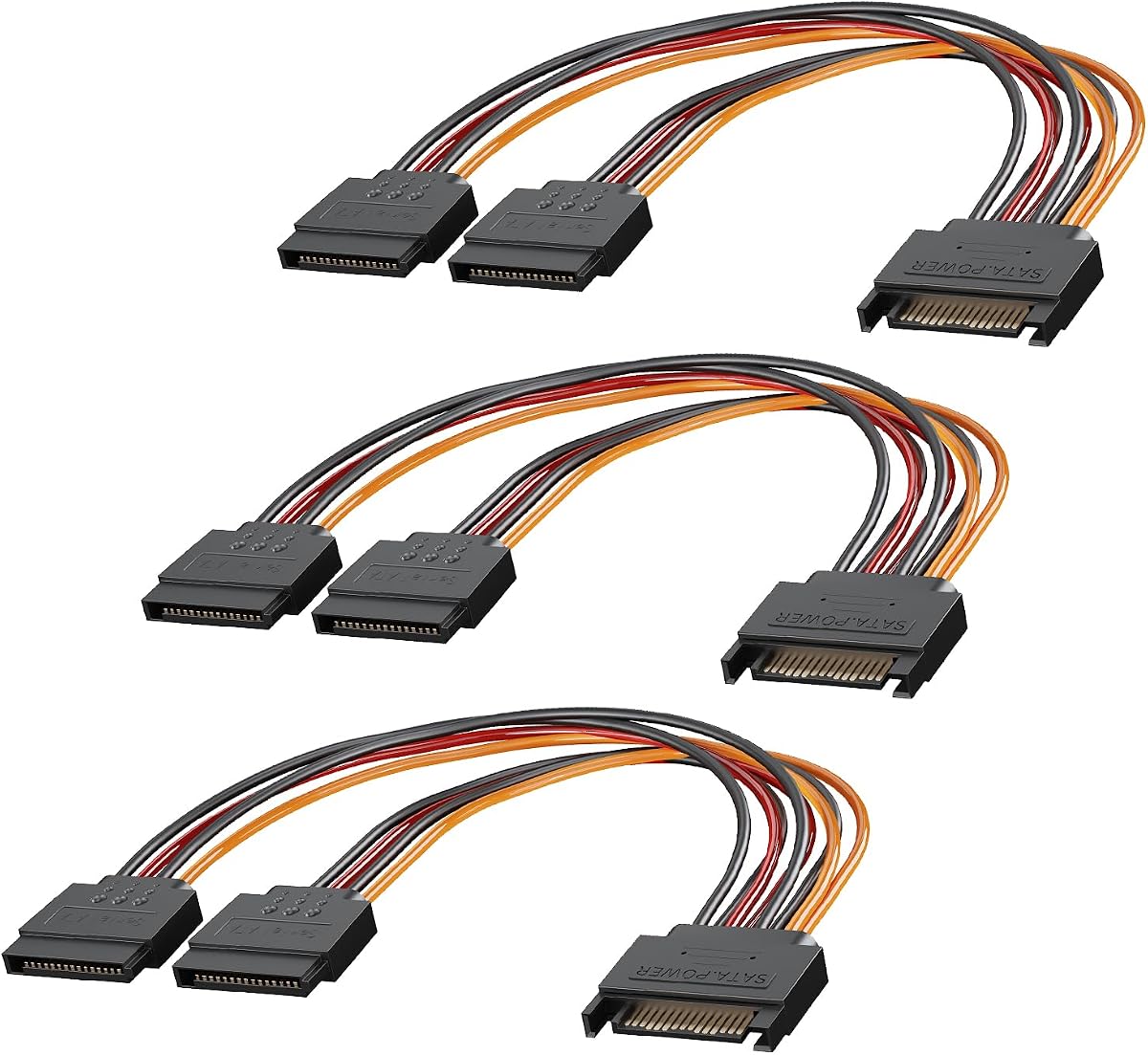
This high-quality cable is designed to split one 15 Pin SATA connector into two separate SATA power connectors, allowing you to easily connect multiple HDD, SSD, and Optical Drives to your system. With a solid 4.7 rating, it ensures stable power transmission and effectively delivers power to each individual device, ensuring optimal functionality for your storage needs.
We may earn a commission when you buy through this link, at no additional cost to you.
Its wide compatibility means it works with various devices such as HDD, SSD, and Optical Drives, whether you need to power up your storage drives or optical devices. The easy installation design allows users to simply connect the 15 Pin SATA end to your power supply and plug in the two SATA connectors to your devices without additional tools or expertise.
While this splitter is effective for adding one extra drive, it may have a shorter effective length than dedicated 8-inch options, which could limit reach in larger cases. However, the durable construction made with high-quality materials ensures long-lasting durability, making it a reliable choice for your power supply needs and a cost-effective way to expand drive capacity.
This is a reliable choice for those needing a simple and efficient way to add a second drive to their system. Its sturdy construction and user-friendly design make it a practical addition to any build where a single power port needs to serve two devices without complex rewiring or expensive PSU upgrades.
Converts one power port into two for easy dual-drive installation.
High-quality materials ensure the cable withstands frequent use and long-term operation.
We may earn a commission when you buy through this link, at no additional cost to you.
This 15 pin SATA power y-splitter provides one male SATA connector to two female outputs, allowing you to power two HDDs, SSDs, or optical drives from a single SATA power port on your PSU. With an impressive 4.8 rating, it features snug-fitting connectors with channel guides that ensure a safe connection that won’t accidentally disconnect.
We may earn a commission when you buy through this link, at no additional cost to you.
The flexible 8-Inch Y cable helps keep internal cabling neat, reduces clutter, and provides sufficient reach for most PC tower and workstation configurations. Heavy-duty conductors support 3.3V, 5V, and 12V safely, ensuring reliable performance for all SATA-powered components including HDDs, SSDs, optical drives, and PCI expansion cards.
While the price might be slightly higher than generic alternatives, the secure and reliable connections justify the cost by reducing the risk of accidental disconnection during maintenance or transport. As a cost-effective 3 pack for upgrades and repairs, it includes three cables for system upgrades, IT repair kits, or multiple drive installations, saving the expense of upgrading a PSU.
This splitter is ideal for users who prioritize connection security and cable management in their builds. Its multi-voltage compatibility and robust construction make it a versatile choice for both standard desktop setups and more complex workstation configurations where stable power delivery is critical for performance and data integrity.
Snug-fitting connectors with channel guides prevent accidental disconnection during use.
Heavy-duty conductors safely handle 3.3V, 5V, and 12V for all SATA devices.
We may earn a commission when you buy through this link, at no additional cost to you.
StarTech.com is a well-known brand for PC components, and this cable offers a specific utility: converting 1x SATA Power Plug to 4x SATA Power Receptacle. With a solid 4.7 rating, it provides a way to expand power ports significantly using a single input, which is useful for builds requiring multiple SATA drives from a limited PSU.
We may earn a commission when you buy through this link, at no additional cost to you.
The product features durable construction designed to handle the demands of internal PC environments and ensure long-term reliability. As an adapter cable, it bridges the gap between your power supply output and multiple drive inputs, utilizing standard M/F connection types that align with common SATA power specifications and industry standards.
While specific details on length or additional features are limited in the provided data, the core functionality of splitting one connection into four is clearly defined and highly functional for storage arrays. The focus on durable construction suggests it can withstand repeated plugging and unplugging, which is a common requirement when swapping out drives in a workstation or server environment.
This is a practical solution for users who need to maximize the utility of a single power port without complex daisy-chaining. Its reliable delivery and durable build make it a solid option for professionals or enthusiasts who prioritize brand reputation and component longevity in their system builds.
Converts a single power plug into four receptacles for multiple drive connections.
Constructed to withstand internal PC environments and ensure long-term reliability.
We may earn a commission when you buy through this link, at no additional cost to you.
This 15 pin SATA power extension cable extends your existing PSU connection, providing a reliable link between the power supply and SATA HDDs, SSDs, optical drives, and other SATA devices. With a 4.7 rating, it is designed to reduce connector stress and improve cable management, helping to reduce strain on tight motherboard and PSU connections.
We may earn a commission when you buy through this link, at no additional cost to you.
Each SATA extension cable measures 12 inches, offering an ideal balance between flexibility and space-saving design, making it suitable for PC towers, upgrades, and replacement builds requiring a clean internal layout. Built with durable conductors for reliable 3.3V / 5V / 12V power transmission, it ensures stable performance for HDDs, SSDs, and optical drives without power loss or degradation.
While extension cables technically add a small amount of resistance, this product's focus on stable power delivery ensures that performance is not compromised in standard setups. The cost-effective 3 pack includes three cables, perfect for system builders, IT technicians, or users needing multiple SATA hard drive extension cable replacements or upgrades for various systems.
This extension set is perfect for those who need to route power more cleanly across a case or reach drives that are positioned further away from the PSU. By reducing strain on ports, it helps prevent damage to connectors over time, making it a practical accessory for long-term system health and clean cable management.
12-inch length offers ideal balance for routing power without cluttering the case.
Reduces strain on tight motherboard and PSU connections to extend port life.
We may earn a commission when you buy through this link, at no additional cost to you.
This package includes 4PCS extension cables designed to combine data and power into one convenient extension solution. With a high 4.9 rating, it features a thin cable design that helps reduce clutter and increase airflow in the computer or server chassis for optimal system performance, which is especially beneficial in cases with limited airflow space.
We may earn a commission when you buy through this link, at no additional cost to you.
One end is a male connector while the other is a female, allowing you to use this cable to directly connect the device and the hard disk or other SATA devices. The SATA data and power cables are combined into one wire structure, making it very convenient for users who prefer simpler wiring layouts and want to reduce cable complexity inside their PCs.
While combining data and power can simplify routing, it also means you cannot route data and power independently to different locations, which might be a limitation for very specific build layouts. However, the 50cm length provides ample reach for most standard desktop setups, and the copper material ensures good conductivity for both signal and power transmission.
This combo cable is a smart choice for those who want to streamline their internal wiring and reduce the number of separate cables needed. The thin design and high rating reflect strong user satisfaction regarding ease of use and performance, making it a valuable addition for compact builds or servers where airflow and organization are critical.
Combines data and power into a single extension to reduce cable complexity.
Thin cable design helps increase airflow for optimal system performance.
We may earn a commission when you buy through this link, at no additional cost to you.
This cable is a standard power offering from Be Quiet, a brand recognized for quality components in the PC enthusiast market. With a 4.7 rating, it aligns with the high standards typically associated with the brand, providing a reliable connection for SATA devices without requiring complex adapter solutions or extra wiring.
We may earn a commission when you buy through this link, at no additional cost to you.
Although the specific technical details are limited to basic identifiers like BC020, the primary value lies in the trusted branding and consistent quality control that Be Quiet maintains across its product lines. This ensures that users get a product that performs reliably and integrates seamlessly into existing power supply configurations without unexpected issues.
While there are not many unique features listed for this specific cable compared to others, the simplicity and focus on standard functionality make it a good choice for users who prefer sticking to known brands. The professional grade build suggests durability and safety compliance, which are important factors when selecting components for a stable and long-lasting system.
This cable is suitable for those who prioritize brand trust and straightforward functionality over additional features. It serves as a direct replacement or extension option for SATA power connections, ensuring consistent performance for your storage devices while maintaining the build quality expectations associated with professional-grade components.
Trusted Be Quiet brand ensures consistent quality and standard performance.
Designed to meet professional standards for safety and durability.
We may earn a commission when you buy through this link, at no additional cost to you.
This Monoprice adapter cable plugs into a 4-pin Molex power plug and provides four 15-pin SATA power connectors, addressing the gap in legacy system cases and power supplies that may have an insufficient number of SATA power connectors. With a 4.7 rating, you can buy with confidence thanks to Monoprice's lifetime warranty on all cables, standing behind their products and customers.
We may earn a commission when you buy through this link, at no additional cost to you.
The net jacket design and rigid quality control standards deliver high-quality products at fair prices, ensuring durability and consistent performance. As the Serial ATA standard adopts a new 15-pin drive power connector replacing the ubiquitous 4-pin Molex connector, this cable facilitates the transition allowing modern drives to operate with older power supply hardware efficiently.
While it relies on legacy Molex connectors which are becoming less common, its ability to convert one old connector into four new ones is valuable for specific maintenance or upgrade scenarios. The rugged design ensures that even if the connector is frequently swapped, the cable remains durable and reliable, supporting safe and stable power delivery to connected devices.
This is a strong choice for users looking for a robust legacy adapter with exceptional customer backing through a lifetime warranty. It bridges the gap between older hardware and modern storage requirements, ensuring that existing power supplies can continue to support new SATA drives without requiring expensive replacements for the PSU itself.
Monoprice backs this cable with a lifetime warranty for total peace of mind.
Converts old Molex connectors to four modern 15-pin SATA ports.
We may earn a commission when you buy through this link, at no additional cost to you.
Choosing the right hard drive power cable involves understanding your specific system needs and power supply limitations. This guide outlines the critical factors to consider to ensure compatibility, stability, and longevity for your storage setup.
Ensure the cable matches your power supply outputs and drive inputs. Most modern drives use 15-pin SATA connectors, but older systems may require Molex adapters or Y-splitters to utilize legacy ports effectively.
Check your PSU manual or existing cables to confirm available connector types before purchasing.
Determine if you need to add more drive ports (splitter) or reach distant drives (extension). Splitters multiply connections while extensions provide length without changing port count.
Choose splitters for expanding capacity and extensions for cable management flexibility.
Consider the physical distance between your PSU and drive bays. Standard extensions range from 6 inches to 15 inches; longer cables can help route power cleanly but may be harder to manage in small cases.
Select a length that reaches comfortably without excessive slack or tension on connectors.
Look for cables made from high-quality conductors and robust housing materials. Durable construction prevents fraying, ensures stable electrical transmission, and reduces the risk of failure over time.
Prioritize cables with reinforced connectors and proven materials for long-term reliability.
Verify that the cable supports the required voltage levels (3.3V, 5V, and 12V) for your specific drives. Mismatched voltage handling can lead to instability or potential hardware damage.
Ensure the cable explicitly states support for standard SATA voltage requirements.
Cables from reputable brands often undergo stricter quality control and come with better support or warranties. This can be critical if the cable fails, providing peace of mind for important storage setups.
Check for warranty terms and customer reviews to gauge long-term support reliability.
Buying multi-packs often offers better value than single units. These kits are ideal for builders needing multiple cables or spare replacements for future upgrades.
Compare unit prices in packs to determine the most cost-effective option for your needs.
In compact cases, thinner cables with minimal bulk help maintain airflow and prevent overheating. Combining data and power or using flat cables can improve internal clearance significantly.
Choose low-profile designs if your case has tight spacing between components.
To begin, turn off your computer and unplug the power supply unit completely. Open the case and identify the available power ports on your PSU and the SATA ports on your drives. Ensure you have the correct connector type, such as a 15-pin plug, ready for connection.
Plug the cable into the PSU first to anchor one end, then route the cable gently to your drive bays. Avoid sharp bends or pinching the cables under drive trays to prevent damage. Connect the other end securely to the drive, ensuring a snug fit to prevent disconnection.
Regularly inspect cables for signs of wear or fraying, especially if you frequently move your system. Keep dust away from connectors to maintain good electrical contact. If using splitters, ensure the total power draw does not exceed the PSU rail's capacity to avoid instability.
Yes, a SATA power splitter allows you to convert one power port into two or more. This is useful for adding drives without buying a new power supply. Just ensure your PSU can handle the extra load safely.
An extension cable increases the distance between the power supply and the drive while keeping the port count the same. A splitter divides one input into multiple outputs, allowing more drives to connect to a single port.
You need this adapter if your power supply has older Molex connectors instead of modern SATA ports. These cables let you connect new SATA drives to older power supplies, extending their useful life.
Check the product specifications for voltage support. Standard SATA power cables should support 3.3V, 5V, and 12V. If it is not listed, contact the manufacturer to confirm compatibility with your specific drives.
It is generally safe to use multiple splitters, but you must ensure the total power draw does not exceed the PSU's rail capacity. Overloading the rail can lead to system instability or hardware damage over time.
Choose a length that reaches comfortably from the PSU to the drive bay with a little slack for routing. Standard sizes range from 6 to 15 inches. Longer cables are better for large cases while shorter ones reduce clutter in small ones.
We have covered ten top-rated options for hard drive power cables, ranging from simple splitters to complete data and power kits. Each product offers unique benefits depending on your specific needs, such as expanding capacity or upgrading legacy hardware.
Prioritize connection security and cable management when choosing your next accessory. Secure connectors and appropriate lengths help prevent accidental disconnection and maintain system cleanliness, contributing to overall reliability and easier maintenance.
Remember that prices and availability can change. Always verify current details and reviews before making a purchase to ensure you get the best value and performance for your specific system requirements.