
HICTOP Ender 3 Heated Bed
4.5Editor score
Affordable price point
Compatible with multiple models
Max temp 110 degrees C
This guide compares the top heated beds for 3D printers including aluminum and silicone options to help you choose the right replacement for your machine.
Choosing the right heated bed for your 3D printer is essential for successful prints. A good bed ensures proper adhesion and reduces warping issues that can ruin your projects.
We compared ten popular heated beds based on compatibility power output and construction quality. Our list covers various sizes and voltages to fit different printer models and user needs.
Each pick shows key specifications and real user feedback to help you decide. Prices change frequently so always check the current listing before making your final purchase decision.
4.5Editor score

4.5Editor score

5.0Editor score
This side by side comparison highlights key specs across all ten heated beds. Use this table to quickly find the right size voltage and power for your printer setup.

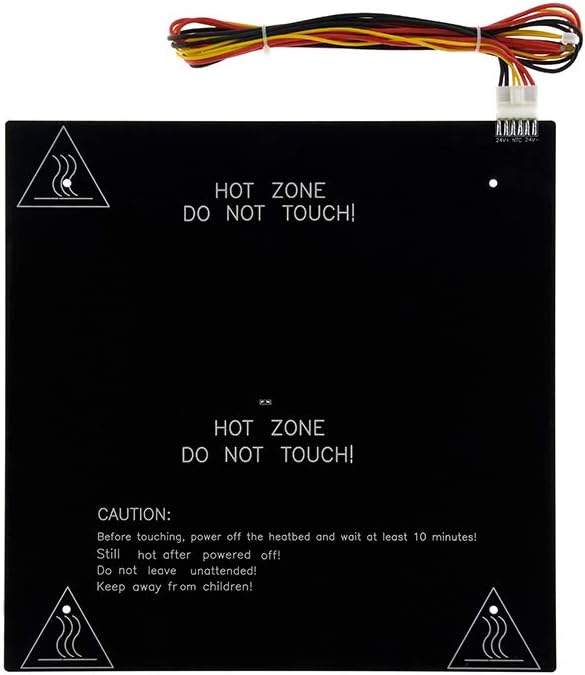


The Official Ender 3 V2 Heated Bed is a top choice for users needing a reliable replacement part. With a 4.5 rating it offers consistent heating and fits perfectly into Creality machines.
We may earn a commission when you buy through this link, at no additional cost to you.
Its 24V 220W power ensures efficient heat distribution across the 235x235mm surface. The included cable simplifies installation making it a straightforward upgrade for any Ender 3 model.
While it lacks advanced features like flexible surfaces its durability is unmatched. Users appreciate the aluminum platform stability which helps prevent warping during long print jobs.
This bed is ideal for anyone owning an Ender 3 series printer. It provides original quality at a reasonable cost ensuring your prints adhere properly without unexpected failures.
Designed specifically for Ender 3 V2 Neo and Pro models this bed eliminates compatibility issues. The dimensions match exactly so no modifications are required for installation.
Saving time on wiring the package includes the assembled cable. This reduces error risk during setup and ensures secure electrical connections from the start.
We may earn a commission when you buy through this link, at no additional cost to you.
The HICTOP Ender 3 Heated Bed offers exceptional value for budget-conscious makers. It matches key specs of official parts but costs less making it a smart swap for worn out beds.
We may earn a commission when you buy through this link, at no additional cost to you.
Compatible with multiple printers including Voxelab Aquila X2 this bed supports up to 110C. The aluminum construction ensures even heating which is crucial for PLA and ABS prints.
Though it lacks some premium features users report reliable performance over time. The included cable simplifies wiring and the mounting holes align well with standard frames.
Choose this bed if you need a cost-effective replacement without sacrificing core functionality. It performs well for everyday printing tasks and maintains good adhesion on the surface.
Works with Ender 3 Neo Pro and V2 plus Voxelab models. This versatility makes it a great option if you own multiple printers or plan upgrades.
Reaches target temps quickly with uniform heat distribution. This reduces print failures caused by cold spots or uneven adhesion during the first layer.
We may earn a commission when you buy through this link, at no additional cost to you.
The FYSETC Silicone Heating Plate is designed for high-performance 3D printer builds like Voron. It offers 750W power ensuring rapid heating and consistent temps across the bed.
We may earn a commission when you buy through this link, at no additional cost to you.
Safety features include a thermal fuse that disconnects if temps exceed 120C. This protects your printer from overheating while maintaining reliable operation during long prints.
Users praise its perfect fit for 300mm build volumes. The silicone material resists wear and provides stable adhesion for engineering materials like PETG and Nylon.
Ideal for DIY enthusiasts upgrading their printers this plate delivers professional results. Just ensure your power supply supports AC voltage to avoid any electrical issues.
750W output means minimal wait time before printing starts. This efficiency boosts productivity for makers who run multiple prints in a day.
Built-in bimetal fuse automatically cuts power if overheating occurs. This critical safety feature protects your machine and home from fire hazards.
We may earn a commission when you buy through this link, at no additional cost to you.
The CR10 Aluminum HeatBed offers a large 310mm surface ideal for bigger projects. Its 3mm thickness provides stability reducing the risk of flex during high-speed printing.
We may earn a commission when you buy through this link, at no additional cost to you.
It comes with a power wire kit for easy integration into CR10 printers. The aluminum material ensures consistent heat spread though some users note slow initial warm up.
Remember to remove the protective film on the back before use. This step is often overlooked but is critical for proper heat transfer and performance.
While ratings are lower this bed remains a solid choice for CR10 owners. It balances size and durability making it suitable for various filament types.
The 310x310mm area allows printing taller or wider objects. This expands capabilities for makers needing more build volume without changing frames.
Includes all necessary wires for setup reducing extra costs. The pre-punched holes align with CR10 mounts for a straightforward replacement process.
We may earn a commission when you buy through this link, at no additional cost to you.
The YWBL-WH Heated Bed supports 500mm prints making it one of the largest available. Its 350W power ensures even heating across the expansive surface for reliable adhesion.
We may earn a commission when you buy through this link, at no additional cost to you.
Integrated heating and aluminum alloy construction help reduce warping. The countersunk holes maintain a flat surface preventing nozzle collisions during operation.
Despite these features user feedback shows mixed results. Some report uneven heat or wiring challenges that may require technical expertise to resolve effectively.
Consider this bed only if you need extreme build volume. Verify compatibility with your printer model carefully before purchasing to avoid fit issues.
A 500x500mm bed allows printing large parts in one go. This is essential for industrial users or hobbyists needing big scale prototypes.
350W output maintains temp over the large area. This power prevents cold spots that could cause layer adhesion failures.
We may earn a commission when you buy through this link, at no additional cost to you.
This bed is tailored for Anet A8 and A6 models offering a direct upgrade. The 12V 120W power provides sufficient heat for standard printing tasks.
We may earn a commission when you buy through this link, at no additional cost to you.
Its aluminum substrate ensures durability and long-lasting performance. Users find installation simple thanks to included wire and cable components.
While not compatible with high voltage systems it suits 12V printers well. The 220mm size fits compact machines effectively without wasting space.
Choose this if you own an Anet printer needing a replacement. It restores print quality and adhesion at a reasonable price.
Dimensions and voltage match Anet A8 and A6 exactly. This ensures proper fit without requiring modifications to the printer frame.
120W resistance wire heats the plate efficiently. This power level is adequate for PLA and ABS while keeping energy use moderate.
We may earn a commission when you buy through this link, at no additional cost to you.
This 400mm bed bridges the gap between standard and large formats. It offers 280W power for fast heating ensuring your prints start quickly.
We may earn a commission when you buy through this link, at no additional cost to you.
The aluminum alloy kit includes countersunk holes for a flat surface. This design prevents nozzle collisions and improves print quality overall.
Lacking user feedback means less community insight. However the specs suggest reliability for those upgrading Ender 3 or CR-10 systems.
Check your printer frame size before buying. This bed requires mods to fit standard frames but offers valuable extra build space.
400mm surface allows medium large prints. This is ideal for makers who outgrew 220mm but don't need 500mm volume.
Precision crafted board ensures smooth performance. This feature reduces electrical risks and provides peace of mind during operation.
We may earn a commission when you buy through this link, at no additional cost to you.
This 500mm bed offers 350W power for fast heating and reliability. The aluminum alloy substrate supports consistent temp control during long prints.
We may earn a commission when you buy through this link, at no additional cost to you.
It claims rapid heat up to 100C in 90 seconds. This speed is great for productivity and reduces waiting time between prints.
No user ratings make verification difficult. Check specs carefully to ensure it matches your printer voltage and frame requirements before buying.
Consider this if you need large volume for custom projects. The flat design helps prevent nozzle crashes and improves print quality.
Reaches 100C in just 90 seconds. This efficiency is valuable for makers running multiple jobs quickly.
Integrated heating plate maintains consistent output. This stability prevents warping and ensures uniform adhesion across the entire bed.
We may earn a commission when you buy through this link, at no additional cost to you.
This silicone pad is made for Voron 2.4 R2 and Trident printers. It uses 220V 750W power for quick heating and even distribution.
We may earn a commission when you buy through this link, at no additional cost to you.
Perforated holes simplify installation without extra modifications. The stable power supply minimizes temperature fluctuations reducing print defects.
Because it is 220V verify your power source. Using it on 110V systems will cause performance issues or damage.
Choose this for a direct replacement in Voron setups. Its design ensures compatibility and efficient thermal performance.
Designed specifically for Voron 2.4 R2 builds. The dimensions match exactly ensuring seamless integration with the printer frame.
High wattage ensures uniform temp across the bed. This reduces cold spots that often lead to layer adhesion issues.
We may earn a commission when you buy through this link, at no additional cost to you.
The Tosuny Heated Bed holds a perfect 5.0 rating from users. Its silicone material offers flexibility and high temp resistance for reliable printing.
We may earn a commission when you buy through this link, at no additional cost to you.
It heats quickly and transfers heat evenly across the 235mm surface. This ensures strong adhesion for various filaments without warping issues.
Keep in mind the silicone limit is 200C. Exceeding this may damage the material so use caution with high temp engineering plastics.
Ideal for those wanting a flexible alternative to aluminum. Its performance and rating make it a top choice for CRX and Ender3 users.
Silicone material withstands high temps without cracking. This flexibility helps it conform to surfaces for even heat transfer.
Heats up quickly to save time before printing. This efficiency reduces downtime and improves overall workflow productivity.
We may earn a commission when you buy through this link, at no additional cost to you.
Selecting the right heated bed depends on your printer model and desired build volume. Consider size voltage and material to ensure compatibility and performance.
Measure your printer frame to find the correct dimensions. Beds range from 220mm to 500mm affecting what size prints you can produce.
Choose a bed that matches your printer exactly to avoid mounting issues.
Check your printer motherboard voltage 12V or 24V. Using wrong voltage can damage electronics or cause poor heating.
Match power wattage to ensure fast heat up and stable temperature.
Aluminum beds are rigid and durable for standard printing. Silicone pads offer flexibility and even heat for complex prints.
Silicone is great for replacements but aluminum lasts longer over time.
Ensure the bed supports temps needed for your filaments. Some ABS and engineering plastics need higher than 100C.
Check max temp ratings to avoid damaging the heating element.
Verify hole distance and diameter match your printer frame. Countersunk holes prevent nozzle collisions and improve bed flatness.
Misaligned holes require drilling which may void warranties or damage parts.
Some beds include wiring cables and mounting screws. Others need you to source these separately adding to the cost.
Look for complete kits to simplify installation and save time.
Stick to well known brands for reliability and support. Check customer reviews to gauge real world performance.
A warranty protects you against defects and ensures long term value.
Thermal fuses and stable circuits prevent overheating risks. These features are vital for safe operation especially with high wattage beds.
Always prioritize safety components when using AC or high voltage systems.
Clean the bed surface regularly with isopropyl alcohol to remove oils. This maintains adhesion and prevents print failures.
Inspect wiring and connectors for wear before each print session. Loose connections can cause uneven heating or electrical issues.
Avoid letting the bed cool completely between prints to save energy. Keep temps stable to reduce thermal stress on the material.
Yes always remove the protective film before use. Leaving it on blocks heat transfer and can cause damage to the heating element.
No using wrong voltage damages electronics and prevents heating. Always match bed voltage to your printer motherboard specification.
Measure the metal plate dimensions of your current bed. Match width length and hole placement to ensure a perfect fit.
Uneven heating often means the element is old or connections are loose. Check wiring or replace the bed if the problem persists.
Silicone offers flexibility and even heat while aluminum is more durable. Choose based on your printer type and printing style needs.
Heated beds typically last several years with proper care. Regular cleaning and avoiding overheating extend their usable life significantly.
The Official Ender 3 V2 Heated Bed tops our list for reliability. It offers perfect fit and solid performance for Creality users.
Prioritize voltage and size to ensure compatibility with your printer. A wrong choice can lead to wasted money or installation issues.
Check current prices and availability before buying since they fluctuate. Always read reviews to confirm the product meets your needs.