
Harvopu for iPad A16
4.3Editor score
RGB backlit keys
Multi-touch trackpad
Long battery life
This guide compares the top ten iPad A16 Folio Case with Keyboard options to help you find the perfect accessory for your iPad in October 2026.
Finding the right iPad A16 Folio Case with Keyboard can transform your tablet into a powerful laptop replacement. These accessories offer protection, typing comfort, and portability all in one sleek package for daily productivity.
We evaluated ten leading models based on build quality, trackpad performance, battery life, and overall usability. Our detailed comparisons highlight key features to ensure you choose a case that matches your specific workflow needs effectively.
Each selection showcases unique strengths whether you prioritize budget friendly options or premium magnetic designs. Prices and availability may change quickly so verify details before purchasing to secure the best deal for your setup today.
4.3Editor score

4.4Editor score

4.4Editor score
The following table provides a side by side comparison of all ten reviewed models to help you quickly identify key specifications and unique features for your decision making process.




The Apple Magic Keyboard Folio stands out as a top tier option for iPad A16 users seeking a seamless typing experience. It combines a protective case with a detachable keyboard and trackpad that connects magnetically without any Bluetooth pairing steps.
We may earn a commission when you buy through this link, at no additional cost to you.
This model features a versatile two-piece design that allows you to detach the keyboard for lighter use. The built-in trackpad supports precise multitouch gestures and a cursor for productivity tasks. It includes a dedicated function row for media controls.
While it offers premium build quality and comfort the price is higher than third-party alternatives. The white finish may show wear over time compared to darker options. These trade-offs are acceptable for those prioritizing seamless integration with iPadOS.
Ideal for professionals needing reliable daily tools the Magic Keyboard Folio delivers unmatched convenience. It transforms your iPad into a capable workstation without compromising portability or protection during transit or remote work sessions.
The keyboard and case attach magnetically to the iPad for front and back protection without pairing or charging.
A large click-anywhere trackpad supports multitouch gestures and cursor control for efficient navigation and app switching.
We may earn a commission when you buy through this link, at no additional cost to you.
The Harvopu keyboard case offers an affordable entry point for users needing both protection and typing functionality. It includes a multi-touch trackpad and RGB backlighting that can be adjusted to suit different lighting conditions.
We may earn a commission when you buy through this link, at no additional cost to you.
Its detachable magnetic keyboard connects via Bluetooth with a quick process. The case features a stain-resistant soft PU material and a TPU interior with honeycomb design for heat dissipation and protection from shocks.
While it requires Bluetooth pairing and charging the battery life is robust. The RGB lights add visual appeal but may drain power faster than single-color options. These details make it a strong budget choice for students.
This model is perfect for those wanting laptop features at a lower cost. It balances functionality and style effectively making it suitable for home office or school use where budget constraints exist.
Seven RGB pure backlit colors with three brightness levels allow relaxed typing in dim conditions or creative setups.
The case uses upgraded soft PU and TPU honeycomb design to resist stains and protect the tablet from daily wear.
We may earn a commission when you buy through this link, at no additional cost to you.
The typecase Edge introduces a floating magnetic stand that holds your iPad above the keyboard for a true laptop-like setup. This design improves typing ergonomics and screen visibility for remote work or travel scenarios.
We may earn a commission when you buy through this link, at no additional cost to you.
Its precision multi-touch trackpad features palm rejection to prevent accidental cursor movements. The keyboard boasts 11 backlight colors with adjustable brightness plus shortcut keys for brightness and media control.
The synthetic vegan leather exterior adds a premium feel while protecting the device. The magnetic closure is secure but may take practice to align correctly. These factors make it a high-end choice for serious users.
Ideal for productivity-focused users this case supports everyday work efficiently. It offers stability and style with tested hinge reliability and customer support ensuring long-term satisfaction with your purchase.
The magnetic floating stand lifts the iPad for comfortable typing and better screen angles during work or study.
With eleven colors and three brightness levels you can personalize your setup for both function and style.
We may earn a commission when you buy through this link, at no additional cost to you.
The typecase Folio focuses on reducing weight without sacrificing protection. It is designed for those who carry their iPad daily and need a slim profile that fits easily in bags or hands.
We may earn a commission when you buy through this link, at no additional cost to you.
It features a detachable magnetic keyboard with shortcut keys for faster use. The 7-color backlighting and adjustable brightness help visibility in low light. A built-in pencil holder keeps your stylus within reach.
While lightweight the case offers precise cutouts for ports and cameras. The synthetic leather exterior and TPU edges provide daily protection from scratches. It is a practical choice for students or commuters.
This model suits users prioritizing portability and ease of carry. It balances key features with minimal bulk making it suitable for travel or mobile work where adding weight is undesirable.
The lightweight folio combines synthetic leather and TPU edges to protect while keeping the device easy to carry.
A built-in Pencil holder keeps your stylus secure and within reach for quick access during tasks.
We may earn a commission when you buy through this link, at no additional cost to you.
The CHESONA keyboard case offers two wireless channels for pairing with two devices simultaneously. This feature allows easy switching between iPad and Mac for a seamless workflow without repeated pairing steps.
We may earn a commission when you buy through this link, at no additional cost to you.
It includes a multi-touch trackpad with gestures adapted for iOS. The keyboard has a 500mAh battery with a long standby time and auto sleep mode. A built-in pencil holder adds practical utility for stylus users.
The backlight turns off automatically to save power after inactivity. The case design provides precise cutouts for full access to ports. These details make it a strong contender for multi-device users.
Best for professionals switching between devices the case provides flexibility. It balances connectivity options with reliable power management ensuring productivity is not hindered by charging or pairing delays.
Pair up to two devices at once and switch between them with a single click for efficient multitasking.
Standby lasts 120 days and auto sleep activates after 15 minutes of inactivity to save battery life.
We may earn a commission when you buy through this link, at no additional cost to you.
The Logitech Rugged Folio is built for toughness with proprietary shock-absorbent materials exceeding military drop tests. It uses Smart Connector technology for instant connection without Bluetooth pairing steps or extra charging.
We may earn a commission when you buy through this link, at no additional cost to you.
Four unique modes include Type Write Sketch View and Read for flexible use. The keyboard membrane seals in spills and crumbs and can be wiped clean after accidents. A magnetic latch stores your stylus securely.
While the design is durable it adds weight compared to slim cases. The flexible kickstand offers 40 degrees of tilt for viewing angles. It suits users in rough environments or frequent travelers.
Ideal for outdoor or field work this case protects against mishaps. It ensures your device stays functional and safe while providing essential typing and viewing options without complex setup steps.
Smart Connector technology magnetically connects instantly and sources power directly from the iPad without Bluetooth pairing.
Shock-absorbent materials and membrane sealing protect against drops spills and crumbs for long-term durability.
We may earn a commission when you buy through this link, at no additional cost to you.
The typecase Folio Duo adapts from productivity to tablet mode instantly by detaching the keyboard. It supports comfortable viewing in landscape and low-angle setups for drawing or writing with stable support.
We may earn a commission when you buy through this link, at no additional cost to you.
A precision trackpad enables smooth scrolling and multitouch gestures. The keyboard offers 7-color backlighting for personality and visibility. A refined leather-style exterior protects the device from daily wear.
With precise cutouts the case maintains full access to buttons and ports. It includes a 12-month warranty and responsive support for peace of mind. These features suit users wanting versatility and style.
Perfect for mixed usage scenarios this case offers freedom to switch modes. It balances protection and functionality ensuring you can work read or draw without removing the entire case.
Adapt effortlessly from typing to reading or drawing without removing the whole case for a slimmer experience.
Enjoy a softer quieter typing experience with a well-spaced keyboard and shortcut keys for faster productivity.
We may earn a commission when you buy through this link, at no additional cost to you.
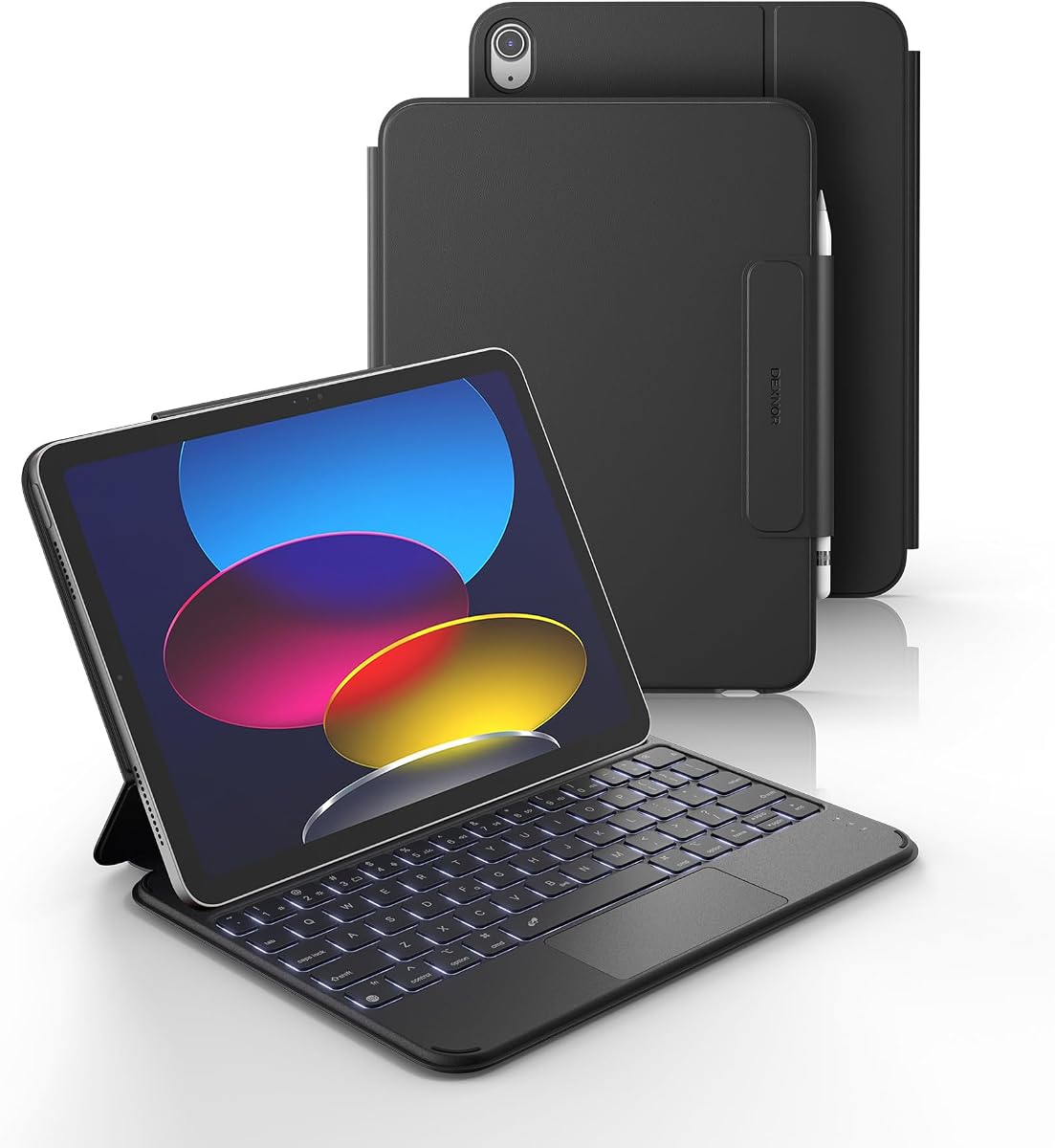
The Dexnor keyboard case is designed for travel on the move weighing only 1.16 lbs. The reinforced magnetic system anchors the iPad securely allowing confident typing even when holding it with one hand.
We may earn a commission when you buy through this link, at no additional cost to you.
It features a built-in multi-touch trackpad with gesture support for editing and browsing. The 650mAh battery supports 200 hours of typing and auto sleep after 30 minutes to save power.
The keyboard sits flat with the screen not floating which may reduce ergonomics. The white backlight adjusts for visibility in dark rooms. A pencil holder keeps your stylus safe during transit.
Ideal for students and mobile professionals this case prioritizes portability. It ensures reliable power and stability making it suitable for long commutes or business trips where weight matters.
Designed for students and professionals the keyboard case weighs just 1.16 lbs for easy commute and travel.
The 650mAh battery supports up to 200 hours of typing and 1200 hours of standby reducing charge frequency.
We may earn a commission when you buy through this link, at no additional cost to you.
The ESR keyboard case features an extra-large precision trackpad that is 65% larger than regular keyboards. It supports intuitive gestures from one-finger drag to three-finger scroll for smooth navigation.
We may earn a commission when you buy through this link, at no additional cost to you.
It uses a magnetic detachable design allowing instant attachment or removal for tablet mode. Two viewing angles of 65 and 20 degrees keep everything steady without wobbling or tipping on surfaces.
The case is ultra-thin at 6.9mm and lightweight for easy carry. Air Guard corners protect from drops while magnetic strips secure the iPad. Lack of backlight may limit low-light typing.
Best for users prioritizing navigation precision this case excels in touch control. Its slim profile and solid protection make it a great choice for daily use and travel.
Enjoy a 65% larger touchpad than regular keyboards for effortless smooth and responsive navigation and scrolling.
Durable form-fit cover with Air Guard corners and magnetic strips keeps the iPad safe from scratches and drops.
We may earn a commission when you buy through this link, at no additional cost to you.
The CC Store keyboard case delivers over 200 hours of working time after just 2 to 3 hours of charging. Its adjustable kickstand offers multiple tilt angles for ideal typing or viewing on desks or couches.
We may earn a commission when you buy through this link, at no additional cost to you.
The keyboard is magnetic and attaches strongly to the case or can be detached completely. It connects via Bluetooth and reconnects immediately upon turning on. The premium PU leather defends against scratches and spills.
A convenient pencil holder keeps your stylus safe and accessible. The case provides full protection with minimal bulk for daily tasks. These features make it a reliable choice for budget-conscious users.
Ideal for extended usage this case ensures you stay productive without frequent charging. It balances protection and battery life making it a strong option for students or casual users.
Delivers 200 hours of working time after just 2 to 3 hours of charging for worry-free daily use.
Strong magnetic attachment allows keyboard to be stored away easily and reconnects immediately via Bluetooth.
We may earn a commission when you buy through this link, at no additional cost to you.
Selecting the ideal iPad A16 Folio Case with Keyboard requires evaluating several key factors to ensure compatibility performance and durability match your workflow needs.
Verify the case supports your exact iPad A16 11th Generation 2025 models A3354 A3355 or A3356 or iPad 10th Gen 2022 models A2696 A2757 or A2777. Many third-party cases are specific to these models so check the product data carefully before purchasing.
Always confirm model numbers on the back of your device to avoid sizing issues.
Decide between Bluetooth pairing and Smart Connector options. Bluetooth keyboards offer flexibility but require charging and pairing steps while Smart Connector ones connect instantly without charging but may have limited compatibility.
Bluetooth options provide more flexibility for multi-device setups.
Many modern cases include multi-touch trackpads that support gestures for scrolling switching apps and editing. Precision trackpads with palm rejection help prevent accidental cursor movements during typing.
Look for trackpads with gesture support for laptop-like control.
Some models offer RGB or single-color backlighting for typing in low light. Check if brightness is adjustable and if the backlight has auto-off features to conserve battery.
Adjustable brightness and multiple colors add versatility for various lighting conditions.
Adjustable stands offer multiple angles for typing viewing or drawing. Floating stands elevate the screen for better ergonomics while fixed stands provide stability for specific tasks.
Choose stands that support your preferred use cases such as writing or media viewing.
Built-in batteries power the keyboard and trackpad. Look for high capacity options like 500mAh or 650mAh that last hundreds of hours on a single charge. Charging via Type-C is faster and more convenient.
Long battery life reduces interruptions during work or travel.
Materials like PU leather synthetic leather and TPU provide protection against drops and scratches. Shock-absorbent tech and sealed membranes defend against spills and accidents.
Prioritize sturdy materials if you use your iPad in rough environments.
Lightweight cases under 1.2 lbs are easier to carry for students and travelers. Heavier options may offer more protection or features but add bulk to your daily setup.
Balance protection and weight based on how often you carry the device.
Connect the keyboard to your iPad by enabling Bluetooth and entering pairing mode usually via a specific function key combo. Keep the devices close during the process to ensure a stable link.
Clean the case regularly with a soft dry cloth to prevent dirt buildup. Avoid exposing the keyboard to liquids unless it has a sealed membrane to maintain longevity.
Store the keyboard in a safe place when detached to prevent physical damage. Charge the keyboard periodically even when not in use to maintain battery health.
Many cases listed are compatible with both iPad A16 11th Gen and iPad 10th Gen models. Always check the specific model numbers in the product description to confirm fit before purchasing.
Battery life varies by model but many offer between 200 to 1000 hours of standby time. Active typing with backlight may reduce this duration but most recharge fully in a few hours.
Most designs feature detachable magnetic keyboards that allow you to use the iPad independently. The case often remains attached for protection while the keyboard can be stored away when not needed.
Many models include built-in pencil holders or slots to keep your Apple Pencil or stylus secure. This adds convenience for users who frequently switch between typing and drawing modes.
Some cases feature RGB or single-color backlit keys while others do not. If typing in low light is important choose a model with adjustable backlighting to suit your environment.
Bluetooth keyboards typically remember paired devices and reconnect automatically once enabled. You may only need to pair initially or if switching between multiple devices with different settings.
The top picks highlighted offer a range of options from premium magnetic designs to budget-friendly alternatives with trackpads and backlighting.
Prioritize factors like connectivity type battery life and protection features that align with your specific work habits and travel needs.
Prices and stock vary so review current listings and specifications to ensure you get the best value for your investment in the future.