
KPXOS OSU3X Custom Gaming Keyboard
3.4Editor score
Adjustable trigger distance
Visual feedback display
Plug and play setup
Discover the top 10 keyboards for Geometry Dash compared for precision and speed in October 2026 with detailed reviews of magnetic switches and rapid trigger
Finding the right keyboard for Geometry Dash requires understanding rapid trigger technology and magnetic switches that deliver ultra fast response times for rhythm gaming precision.
This guide compares ten top rated options based on user feedback and technical specifications to help you choose the best tool for mastering difficult levels and patterns.
Each pick highlights unique features like custom screens and adjustable actuation points while noting that pricing may vary over time so check current listings before buying.
3.4Editor score
4.7Editor score

4.5Editor score
The following table offers a side by side comparison of all ten keyboards highlighting key specifications and features to help you make an informed decision quickly.





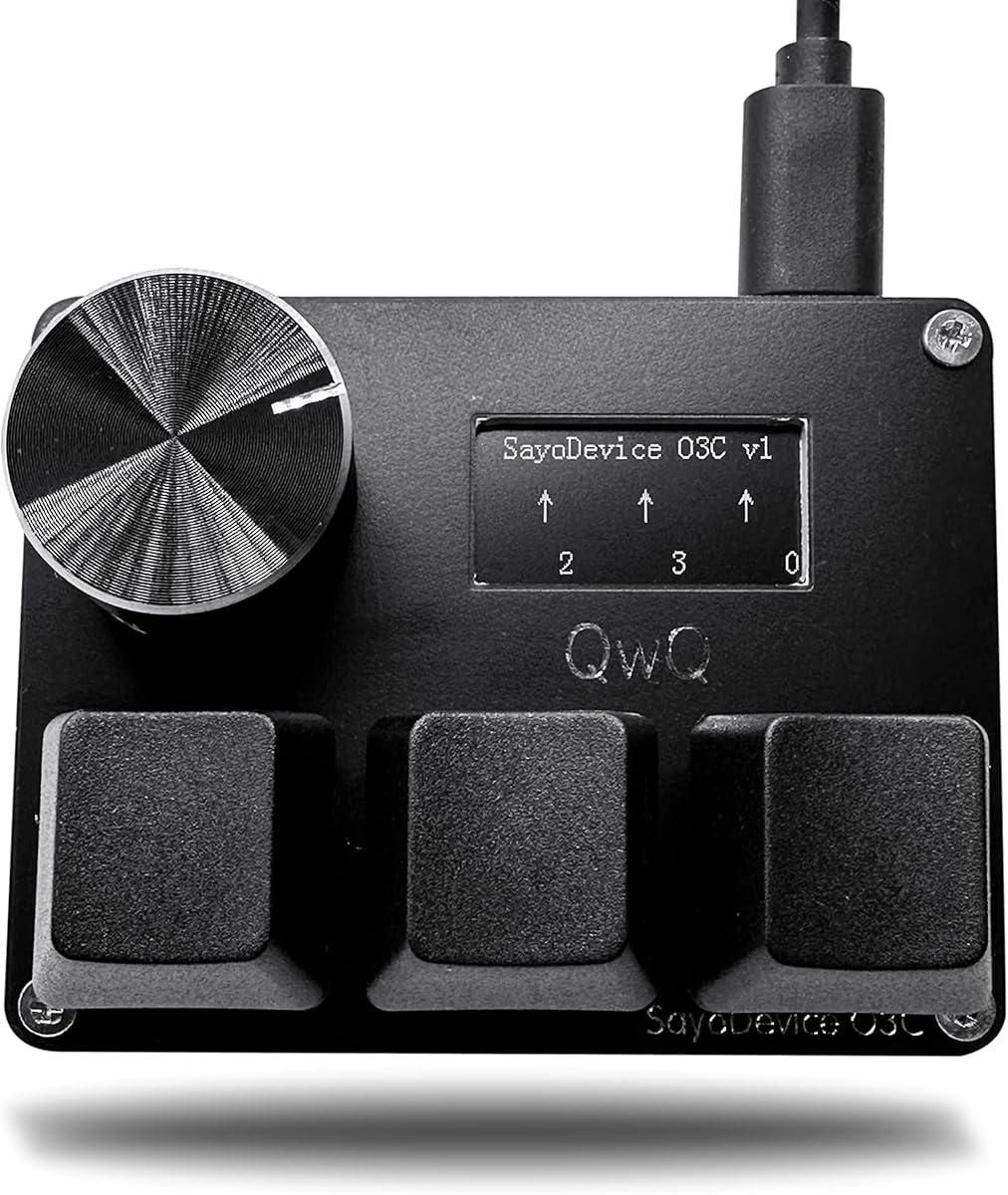
This BTXETUEL SayoDevice O3C keyboard is a top choice for Geometry Dash players seeking speed and precision. It holds a strong rating of 4.7 stars and stands out for its rapid trigger Hall switches that reset keys faster than mechanical ones.
We may earn a commission when you buy through this link, at no additional cost to you.
The keyboard features 3 Hall magnetic linear switches with an adjustable trigger distance that lets you fine tune actuation points for your specific playstyle. The 0.96 inch IPS color screen displays key counts and custom text which adds a personal touch while you practice levels.
Some users note that calibration is needed before first use or after firmware upgrades which adds a small setup step. The mini keypad layout also means you must map keys carefully if you rely on standard function keys outside the device range.
If you want a dedicated tool optimized for rhythm gaming and OSU like inputs this keyboard delivers the responsiveness needed for difficult Geometry Dash levels. Its unique screen and knob features make it a standout pick for players who value customization and speed.
The Hall magnetic switches enable rapid trigger tech that resets keys based on movement instead of fixed points for faster response times.
You can personalize the screen with your own ID or stats and assign the knob to scroll through song lists for better workflow.
We may earn a commission when you buy through this link, at no additional cost to you.
The KPXOS OSU3X offers an affordable entry into rapid trigger keyboards for Geometry Dash and OSU players. With a rating of 3.4 stars it is a budget friendly option that includes magnetic switches and a visual feedback display.
We may earn a commission when you buy through this link, at no additional cost to you.
Its flexible calibration setup allows each key to support independent adjustment with a trigger distance as low as 0.05mm. The home display shows real time key travel and action feedback which helps users understand their input timing during practice.
Some users report a lower overall satisfaction score which may stem from the minimalist key count or software limitations. The device is best suited for dedicated rhythm gamers who need specific rapid trigger capabilities rather than a full typing keyboard.
For those on a tight budget who still want magnetic switch performance this keyboard provides a solid foundation. Its visual feedback and calibration tools help improve reaction times even if the feature set is simpler than premium models.
The 0.96 inch IPS screen visualizes key travel and status in real time to enhance user interaction during gameplay sessions.
Each key supports independent calibration so you can fine tune trigger distances to match your finger strength and gaming style.
We may earn a commission when you buy through this link, at no additional cost to you.
The Aula WIN60 HE is a high performance 60 percent keyboard designed for gamers who need speed and precision. It earns a strong 4.5 star rating and uses advanced Hall Effect magnetic switches to deliver an 8000Hz polling rate for near instant input.
We may earn a commission when you buy through this link, at no additional cost to you.
Its rapid trigger mode allows for a ultra-low RT step distance of 0.02mm which is ideal for complex combos and quick key resets. The compact layout saves desk space and the web based driver makes customization easy without installing heavy software.
The limited key count means you must rely on function layers to access arrows and media controls which may take time to learn. The web driver also requires an internet connection for setup which could be a hurdle if you prefer offline configuration.
If you want a robust gaming keyboard that balances performance and portability this model is a top contender. The magnetic switch precision and rapid trigger tech make it a serious tool for mastering high speed Geometry Dash patterns.
Hall Effect magnetic switches eliminate physical contact wear and provide consistent actuation with rapid trigger technology for competitive edges.
You can remap keys and create macros via a lightweight web driver that works from any device with an internet connection.
We may earn a commission when you buy through this link, at no additional cost to you.
This BTXETUEL SayoDevice O3C keyboard mirrors the top ranked model with the same 4.7 star rating and rapid trigger magnetic switch performance. It is built for OSU and Geometry Dash players who need ultra fast key reset capabilities for rhythm gaming.
We may earn a commission when you buy through this link, at no additional cost to you.
Features include 3 Hall magnetic linear switches and an 0.96 inch IPS color screen that displays custom text and button counts. The programmable knob can be assigned to scroll through song lists or other tasks improving your workflow during practice.
The main drawback is the need for calibration before first use which adds a setup step. The mini keypad design also limits the number of available keys so you may need to map shortcuts carefully for your specific needs.
If you are looking for a reliable mini keypad optimized for speed this keyboard is a great option. Its combination of magnetic switches and visual feedback makes it a favorite among players who prioritize responsiveness.
Replaceable Hall magnetic switches support hotswap and allow simple click calibration for precise trigger distance adjustments.
The first line of text on the screen is customizable so you can write your own ID or stats for a personalized setup.
We may earn a commission when you buy through this link, at no additional cost to you.
The O3C Rapid Trigger Keyboard is designed for OSU and Geometry Dash with a 4.6 star rating and professional Hall magnetic switches. It provides rapid trigger technology and an adjustable trigger release from 0 to 4.000mm for precise control.
We may earn a commission when you buy through this link, at no additional cost to you.
Its 0.96 inch IPS color screen supports custom animations and shows visible key range and button counting. The keys and knob can be set with any key combination including ctrl alt shift plus any keys for advanced macros and shortcuts.
As a mini keypad the device has a low key count which requires careful mapping for complex sequences. The calibration process is similar to other O3C models and must be done before first use or after firmware upgrades.
For players who want a compact board with professional grade magnetic switches this model is a strong choice. The custom animations and trigger release options make it a versatile tool for rhythm gamers.
You can customize the trigger release from 0 to 4.000mm to match your key stroke depth for optimal rapid trigger performance.
The keyboard supports any Hall magnetic switches with a simple click for calibration so you can experiment with different feels easily.
We may earn a commission when you buy through this link, at no additional cost to you.
The RedThunder K95 Wireless is a feature rich mechanical keyboard with a 4.2 star rating that includes a 1.14 inch TFT screen and customizable CNC knob. It offers triple mode connection for seamless switching between devices and wireless use.
We may earn a commission when you buy through this link, at no additional cost to you.
Its gasket structure provides a soft and comfortable typing experience with five-layer shock absorption. The hot swappable PCB allows you to replace 3-pin or 5-pin switches without soldering so you can find the perfect feel for your style.
Unlike the dedicated rapid trigger keyboards this model lacks adjustable actuation points which may limit precision for fast rhythm gaming. However its wireless freedom and visual feedback make it a strong all-rounder for players who also type or need mobility.
If you want a stylish keyboard with wireless capabilities and a screen this is a great pick. Its gasket design and pre-lubed switches deliver a smooth feel that works well for both gaming and work tasks.
The triple mode connection lets you switch between Windows MacOS and wireless modes without cables for a faster typing experience.
The 1.14 inch TFT screen and CNC knob can adjust time volume and RGB lighting images for more visual feedback.
We may earn a commission when you buy through this link, at no additional cost to you.
The WIN68 HE Hall Effect keyboard is a high performance 60 percent wired board with a 4.7 star rating. It features Hall Effect magnetic switches with 0.01mm adjustable actuation and rapid trigger technology for faster and more control.
We may earn a commission when you buy through this link, at no additional cost to you.
Its 8000Hz polling rate ensures exceptionally fast input transmission which is ideal for competitive gaming. The advanced features like DKS and SOCD let you fine tune every key to match your playstyle for FPS and rhythm games.
The white color and compact layout might not suit everyone but the gasket structure and PBT keycaps deliver a premium feel. The web based driver makes it easy to customize RGB and key mapping without installing extra software.
For players seeking a lightweight and precise keyboard this model is an excellent option. The rapid trigger and adjustable actuation provide the responsiveness needed for high level Geometry Dash performance.
Dynamic Keystroke and Simultaneous Opposing Cardinal Directions unlock advanced control for complex combos and movement.
Multiple layers of sound dampening foam eliminate harsh vibrations for a quiet and refined typing experience.
We may earn a commission when you buy through this link, at no additional cost to you.
The AULA WIN68 HE is a fast gaming keyboard with a 4.5 star rating that delivers an industry leading 8000Hz polling rate. It offers adjustable actuation from 0.02mm to 3.44mm so you can personalize each key to the smallest unit.
We may earn a commission when you buy through this link, at no additional cost to you.
The customizable web driver allows users to set RT and SOCD and DKS functions and map keys without downloading extra software on Windows. It also supports 16.8 million RGB colors and south facing LEDs for a better visual experience.
The driver does not support Mac systems which limits its reach for some users. The compact 60 percent layout saves desk space but requires function combinations for keys like arrows which some players may find inconvenient.
If you need a fast and affordable wired keyboard this model is a strong contender. The rapid trigger features and web driver make it a practical choice for gamers who want performance without complex software.
With ultra-low latency of 0.3ms the fast trigger mode ensures your commands take effect instantly for an edge in games.
14 preset lighting effects and 16.8 million colors add great ambience and you can adjust brightness via driver or keys.
We may earn a commission when you buy through this link, at no additional cost to you.
The KPXOS OSU3X White version is a budget friendly rapid trigger keyboard with a 3.0 star rating. It includes magnetic switches and a visual feedback display that shows key travel and status in real time for better interaction.
We may earn a commission when you buy through this link, at no additional cost to you.
Precise magnetic calibration lets you adjust trigger distance independently for each key so you can tailor the feel to your needs. The minimalist design includes 3 programmable keys and a rotary knob for multi-key combinations like copy and paste.
The lower rating suggests some users may encounter setup hurdles or software limitations. However its plug and play setup and visual feedback make it a viable option for those trying rapid trigger technology without a big investment.
If you prefer a white aesthetic and want basic rapid trigger features this keyboard is a decent starting point. The calibration and feedback tools help you practice and improve even if the feature set is modest.
Each key supports independent calibration and adjustable trigger distance to match your playstyle and finger strength accurately.
The 0.96 inch IPS color screen visualizes key travel and status to enhance your interaction and practice routine.
We may earn a commission when you buy through this link, at no additional cost to you.
The KPXOS OSU4X is a compact rapid trigger keypad with a 3.1 star rating designed for OSU Geometry Dash and Friday Night Funkin. It features magnetic switches and a 0.96 inch screen that displays key travel and status.
We may earn a commission when you buy through this link, at no additional cost to you.
You can customize the boot interface by modifying the device name through software. The knob can be set to any key such as to scroll through song lists which adds convenience during practice sessions.
The USB 2.0 interface supports 8000Hz polling rate and the cable is 2m long by default. The low satisfaction rating may stem from software quirks or limited functionality but the plug and play nature makes it easy to use.
If you want a simple and compact keypad for rhythm games this model provides basic rapid trigger capabilities. The customization options and high speed polling make it a functional tool for budget aware players.
The first line of text on the main screen is customizable so you can modify the device name through software easily.
Support any magnetic pole and magnetic switch with individual button calibration and trigger travel down to 0.05mm.
We may earn a commission when you buy through this link, at no additional cost to you.
Choosing the right keyboard for Geometry Dash involves understanding key features like switch type polling rate and layout to ensure you can hit patterns accurately and consistently.
For Geometry Dash rapid trigger Hall Effect switches are ideal because they reset keys based on movement rather than fixed points. This allows for faster key repetition and more precise timing which is crucial for difficult levels. Look for models that specify Hall Effect or magnetic technology in the product title or specs.
Avoid traditional mechanical switches that have fixed actuation points if you need maximum speed. Magnetic switches provide consistent actuation without physical contact which reduces wear and ensures long term reliability.
A high polling rate ensures that your computer registers key presses quickly. For competitive gaming a rate of 8000Hz is ideal as it minimizes input lag to near zero. This helps you react faster to in game events and improves overall performance.
Check the product specs for polling rate details and ensure it meets at least 1000Hz but higher is better for rhythm games. Most modern gaming keyboards now support higher rates but dedicated rapid trigger models often excel here.
Compact layouts like 60 percent or mini keypads save desk space and bring keys closer for faster finger movement. However they often require function layers to access arrows or media keys which can slow you down initially. Choose a layout that matches your need for speed versus convenience.
If you rely on arrow keys for navigation or editing consider a 60 percent board that retains them like some models in this list. Pure mini keypads are best if you map shortcuts and do not need standard navigation keys often.
The ability to remap keys and set macros can streamline your workflow. Look for keyboards with web based drivers or software that let you adjust actuation points and trigger distances without installing heavy applications. This flexibility is vital for tailoring the device to your specific playstyle.
Custom screens and knobs are bonus features that allow you to display key counts or assign shortcuts to a scroll wheel. These features add convenience and can help you monitor performance during practice sessions.
A sturdy build ensures the keyboard lasts through intense gaming sessions. Features like gasket mounting and PBT keycaps improve durability and typing feel. Gasket structures reduce harsh vibrations and hollow sounds which makes the device more comfortable to use over long periods.
Check for materials that resist wear such as side printed PBT keycaps that do not fade easily. A reliable build also means fewer hardware issues and a consistent experience over time.
Wired connections provide the most stable input for gaming as they eliminate wireless latency. USB Type C ports are common and offer reversible plugs with high speed data transfer. Wireless modes may be useful for portability but wired is generally preferred for serious gameplay.
If you need multiple device support ensure the keyboard offers seamless switching between wired and wireless modes. This flexibility helps if you share the device between a PC and a laptop for testing or work.
Calibration steps may be required before first use for magnetic switches. Ensure the setup process is straightforward and well documented to avoid frustration. Some models offer plug and play functionality which is ideal if you do not want to spend time configuring settings.
Look for clear indicators or screens that guide you through calibration or key mapping. A user friendly interface saves time and lets you focus on improving your gaming performance instead of troubleshooting setup issues.
Prices vary significantly between basic mini keypads and full sized gaming keyboards. Decide if you need advanced features like web drivers and rapid trigger or if a simpler model suffices. Budget options often lack some customization but still deliver core rapid trigger performance.
Set a budget range and compare the features you need against the price. Investing in a higher rated model may save money long term by offering better durability and customer support.
After unboxing your new keyboard check the product instructions for calibration steps. Connect the USB Type C cable securely and allow the device to install any necessary drivers before using it in-game. For models with screens ensure you press the calibration button as shown in the provided figures.
To get the most out of rapid trigger settings adjust actuation points in the software to suit your finger strength and speed preferences. Map essential keys to your most used buttons and test the response in a practice environment to fine-tune before playing competitive levels.
Maintain your device by avoiding food and drink near the keyboard and keeping it dust free with a soft brush. If it supports hot swap switches you can replace them without soldering to change the feel but ensure power is disconnected during this process to avoid damage.
Rapid trigger technology resets keys based on movement instead of fixed points allowing for faster key repeats. This is essential in Geometry Dash for executing complex patterns and timing precise jumps without delay. It provides a competitive edge by reducing input latency significantly.
Hall Effect switches use magnetic technology to detect key presses without physical contact. This eliminates wear and tear and allows for adjustable actuation and faster reset times. For rhythm gaming this offers superior speed and precision compared to traditional mechanical switches.
Most keyboards in this list are compatible with Windows and support plug and play connectivity. Some features like customization require Windows drivers so ensure your system meets software requirements. Always verify system compatibility on the product page before purchasing.
Wireless keyboards are available but wired is generally recommended for lowest latency. If you choose wireless ensure it supports wired mode for charging and use to maintain consistent response. Some models offer hybrid modes to switch between connection types easily.
Calibration is typically needed before first use or after firmware upgrades. Some models require recalibration if settings change or if you notice inconsistent inputs. Regular checks ensure the actuation points remain precise for your gaming performance.
Web based drivers allow you to customize settings without installing heavy software. They work from any device with an internet connection and simplify key mapping and RGB control. This ensures a lighter system footprint and easier access to advanced features.
A 60 percent layout saves desk space and brings keys closer for faster finger movement. While it lacks a number pad or dedicated arrow keys on some models many include essential function keys. It is ideal if you map shortcuts or do not need extra keys often.
Many models feature hot swappable PCBs that let you replace switches without soldering. This allows you to experiment with different feels or upgrade over time. Ensure the new switches match the PCB specification for compatibility and proper function.
The BTXETUEL SayoDevice O3C and Aula WIN60 HE stand out as top choices for players seeking speed and customization. These keyboards offer rapid trigger technology and high polling rates that are essential for mastering difficult Geometry Dash levels.
If you need a full size layout consider the WIN68 HE or RedThunder K95 Wireless for added features and space. For budget-conscious gamers the KPXOS OSU3X provides a solid entry point with essential rapid trigger capabilities to improve your gameplay experience.
Remember to check current prices and availability before making your final decision. Technology and models evolve quickly so verifying the latest features ensures you get the best value for your specific gaming setup.