
Redragon K512 RGB Membrane Gaming Keyboard
4.5Editor score
Six onboard macro keys
No software required for macros
Detachable wrist rest included
Discover the top keyboards with macro keys for gaming and productivity. We compare features, build quality, and performance to help you choose the right one.
Finding the right keyboard with macro keys can transform your workflow and gaming experience. These devices allow you to automate complex sequences, launch apps instantly, or execute game combos with a single press. Whether you are a streamer, programmer, or competitive gamer, having dedicated macro functionality is essential for efficiency.
We have evaluated ten top-rated models based on their macro customization options, build quality, and overall performance. Our analysis covers mechanical and membrane options, wireless and wired connections, and various price points. Each product was assessed for ease of use, software support, and durability to ensure you get a reliable tool.
Each pick in this guide highlights specific strengths such as onboard recording, hot-swappable switches, or premium software integration. We focus on real-world usability and key features that matter most to power users. Keep in mind that prices and availability can change frequently, so verify current details before making your final purchase decision.
4.5Editor score

4.1Editor score
4.3Editor score
This side-by-side comparison highlights the unique strengths of each keyboard. We look at macro capacity, switch types, connectivity, and extra features to help you find the best fit for your setup.


The VSD K1 Pro stands out as a unique hybrid keyboard that combines macro functionality with a built-in streaming deck. It holds a 4.1 rating and offers a highly customizable experience through its integrated LCD keys and knobs. This device is perfect for users who want to reduce desk clutter while gaining advanced control options.
We may earn a commission when you buy through this link, at no additional cost to you.
Its standout feature is the ability to create unlimited switchable pages on the streaming deck portion of the keyboard. You can assign actions, launch apps, or control media directly from the 6 LCD keys. The hot-swappable PCB allows you to change switches easily, while the 5-layer dampening ensures a premium typing feel.
The reliance on software for screen customization can be a slight hurdle compared to purely hardware-based macros. The screen images and animations require installation under Windows or macOS. However, this trade-off enables deep personalization that hardware-only solutions cannot match.
Anyone needing a full macro and streaming solution should consider this keyboard first. It merges productivity and gaming tools into a single compact unit. We recommend it for streamers or power users who value flexibility over simplicity.
The six LCD keys and three knobs act as a mini control center for your software and media. You can assign shortcuts or execute multi-step flows instantly without needing external hardware.
With hot-swappable support and gasket mount design, you can tailor the sound and feel to your preference. The included puller makes changing switches quick and easy.
We may earn a commission when you buy through this link, at no additional cost to you.
The Redragon K512 offers an excellent entry point for users needing macro keys without breaking the bank. With a 4.5 rating, it delivers solid performance for both gaming and daily tasks. The six macro keys allow you to record and reassign commands directly on the fly.
We may earn a commission when you buy through this link, at no additional cost to you.
Its biggest strength is the no-software requirement for macros, making it ideal for users who want immediate functionality. The dedicated media wheel lets you control volume and track playback effortlessly. The detachable wrist rest adds comfort during long sessions, and the fade-resistant keycaps ensure longevity.
While the membrane switch feel may not satisfy mechanical enthusiasts, it is quiet and reliable. The RGB lighting has 13 modes but lacks advanced per-key customization. For the price, however, the value proposition is very strong.
Buyers looking for a budget-friendly macro keyboard will find this model hard to beat. It simplifies workflow and gaming commands significantly. We highly recommend it for anyone seeking affordability and ease of use.
The G1 to G6 keys allow you to record complex shortcuts instantly without drivers. This feature saves time and makes it great for gamers who want quick combos.
The media wheel provides an intuitive way to adjust volume or skip tracks. You stay in the game without needing to reach for system settings.
We may earn a commission when you buy through this link, at no additional cost to you.
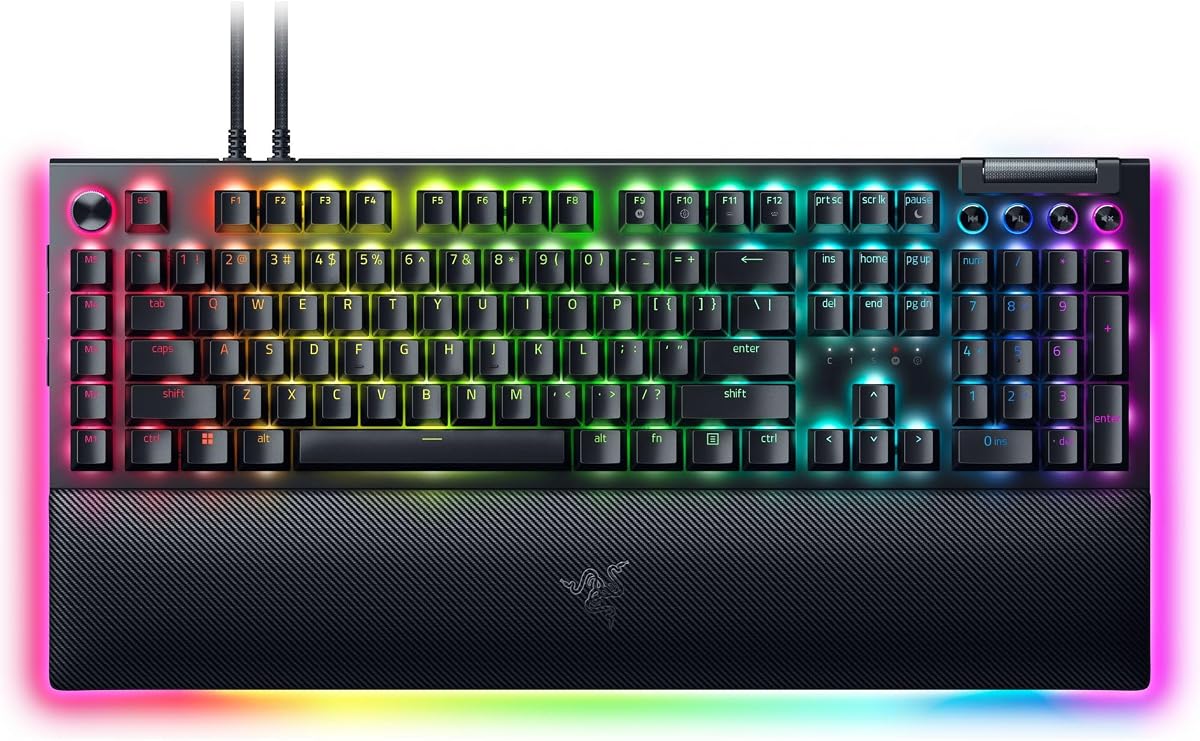
The Razer BlackWidow V4 Pro is a top-tier option for users seeking maximum customization and build quality. It holds a 4.3 rating and features eight dedicated macro keys, more than most competitors. The command dial adds an extra layer of control for media or application settings.
We may earn a commission when you buy through this link, at no additional cost to you.
Its green tactile switches provide satisfying feedback, and the underglow lighting enhances immersion. The magnetic wrist rest is plush and features its own RGB lighting, adding to the premium feel. Doubleshot ABS keycaps ensure that labels never wear off over time.
The higher price reflects the advanced features and materials used. While many functions rely on Synapse software, the hardware quality is undeniable. The command dial allows for unique bindings that standard keys cannot match.
If you want a high-end keyboard with extensive macro capabilities, this is a standout choice. It offers a complete package for gaming and work. We recommend it for enthusiasts who value premium features and comfort.
The programmable dial lets you assign custom functions like brightness control or scrolling. It adds a unique interaction method beyond standard keystrokes.
Per-key lighting and underglow sync with games for a better visual experience. The wrist rest also includes RGB for a unified look.
We may earn a commission when you buy through this link, at no additional cost to you.
The Corsair K55 RGB PRO brings powerful macro capabilities with a unique integration with Elgato Stream Deck software. It holds a 4.4 rating and is great for streamers who need quick access to commands. The six macro keys can launch apps or execute shortcuts efficiently.
We may earn a commission when you buy through this link, at no additional cost to you.
Its IP42 rated design protects against spills, which is crucial for long gaming sessions. The detachable palm rest and media keys improve ergonomics and convenience. RGB lighting covers five zones, allowing for decent customization.
As a membrane keyboard, it may not offer the tactile feedback of mechanical switches. However, the durability and software integration compensate for this. The Stream Deck compatibility is a standout feature for content creators.
Streamers or budget-conscious users should consider this model for its unique software support. It balances cost and functionality well. We recommend it for those who want streaming integration without high costs.
Direct support for Elgato software allows instant commands during streams. This reduces the need for extra peripherals on your desk.
The IP42 rating guards against accidental spills so gameplay never stops. This practical feature extends the keyboard's lifespan significantly.
We may earn a commission when you buy through this link, at no additional cost to you.
The Redragon K580 offers mechanical durability with macro keys at a competitive price. It holds a 4.5 rating and features five dedicated macro keys for on-the-fly recording. The upgraded sockets accept almost any switch, adding flexibility for customization.
We may earn a commission when you buy through this link, at no additional cost to you.
Its stock Brown switches provide a gentle bump with less noise than clicky ones. The full anti-ghosting matrix ensures every input registers during rapid multi-key combos. The media wheel allows for easy volume adjustments without leaving games.
While the software is optional for macros, advanced RGB effects require installation. The hot-swap feature is great for trying different switch types without soldering. This model balances performance and versatility well.
Gamers seeking a mechanical keyboard with macro support will appreciate this value. It offers flexibility and reliability. We recommend it for those wanting mechanical features without a high price.
Save complex combos directly on the keyboard without software. This ensures instant access to macros during intense gaming sessions.
The Brown switches give a satisfying tactile feel without excessive noise. This makes it suitable for shared spaces or late-night use.
We may earn a commission when you buy through this link, at no additional cost to you.
The Redragon K550 RGB stands out with twelve onboard macro keys, offering extensive programmability. It holds a 4.1 rating and features a solid aluminum top plate for durability. The extra USB pass-through port helps reduce cable clutter on your desk.
We may earn a commission when you buy through this link, at no additional cost to you.
Its custom purple switches provide a clear and strong tactile feel. The dedicated media controls and scroll bar allow easy volume adjustment. The wrist rest adds comfort during long sessions, and the aluminum plate keeps the keyboard steady.
The large footprint may not suit smaller desks. However, the macro capacity and build quality justify the size. The USB pass-through is a practical addition for peripherals.
Power users needing many macros should prioritize this model. It offers high customization and solid construction. We recommend it for those requiring extensive command assignments.
With G1 to G12 keys, you can map a wide variety of commands. This is ideal for complex workflows or MMO gaming.
The built-in port allows you to connect mice or dongles directly to the keyboard. This helps manage cables effectively.
We may earn a commission when you buy through this link, at no additional cost to you.
The Razer BlackWidow V4 X features linear yellow switches for rapid inputs and six dedicated macro keys. It holds a 4.5 rating and offers a quiet mechanical experience. The multi-function roller and secondary media keys provide convenient volume and brightness control.
We may earn a commission when you buy through this link, at no additional cost to you.
Its per-key Chroma RGB lighting allows extensive customization with over 16.8 million colors. The doubleshot ABS keycaps ensure labeling never wears off. The sound dampeners and lubricated stabilizers contribute to a satisfying acoustic feel.
While the keycaps are ABS rather than PBT, the durability is still high. The lack of underglow compared to the Pro version is a minor compromise for the price. The linear switches are great for fast-paced gaming.
Gamers preferring silent and fast switches will enjoy this model. It balances performance and aesthetics well. We recommend it for those who like a clean look with powerful macros.
The zero-reset-point switches provide rapid-fire inputs with quiet operation. Built-in dampeners make sure noise stays low.
Per-key customization allows for dynamic lighting effects. Hundreds of integrated games can sync their visuals with the keyboard.
We may earn a commission when you buy through this link, at no additional cost to you.
The Redragon K618 PRO offers a wireless experience with twenty macro keys for extensive control. It holds a 4.1 rating and features tri-mode connectivity for flexibility. The low-profile design reduces travel distance for faster actuation.
We may earn a commission when you buy through this link, at no additional cost to you.
You can jump between USB-C, Bluetooth, and 2.4GHz wireless seamlessly. The Win/Mac switch toggles instantly between operating systems. The stock Red switches deliver linear feedback suitable for gaming or typing.
The slim profile may not suit users preferring taller mechanical switches. However, the connectivity options are excellent for multi-device setups. The macro capacity is impressive for a wireless model.
Wireless users needing many macros should consider this option. It bridges performance and convenience. We recommend it for those working across multiple devices.
Move from PC to laptop to tablet without re-pairing. The zero lag ensures smooth transitions during work.
Shortened travel distance registers keystrokes quicker. Typing feels lighter on your wrists during long sessions.
We may earn a commission when you buy through this link, at no additional cost to you.
The Logitech G213 Prodigy is a full-sized keyboard designed for gaming and productivity. It holds a 4.2 rating and allows macro programming through G Hub software. The anti-ghosting matrix ensures optimal performance during complex inputs.
We may earn a commission when you buy through this link, at no additional cost to you.
Its durable construction repels liquids and crumbs for easy cleanup. The integrated palm rest and adjustable feet improve comfort during long sessions. Five customizable lighting zones sync with other Logitech G devices.
Macros require G Hub software, which may be a hurdle for some users. However, the ease of setup and media controls are convenient. The slim body design fits various desk sizes well.
Users wanting a reliable daily driver with macro capabilities will find this suitable. It offers durability and essential features. We recommend it for general gaming and work use.
Customize lighting, game mode, and macros easily. G Hub syncs with other Logitech devices for a unified setup.
The built-in palm rest reduces wrist stress. Adjustable feet help you find the perfect typing angle.
We may earn a commission when you buy through this link, at no additional cost to you.
The Razer BlackWidow V4 provides six dedicated macro keys with striking 2-side underglow. It holds a 4.2 rating and features linear yellow switches for rapid inputs. The multi-function roller offers ultimate convenience for media and brightness adjustments.
We may earn a commission when you buy through this link, at no additional cost to you.
Its magnetic plush leatherette wrist rest ensures long-lasting comfort. The per-key lighting syncs with hundreds of integrated games. Doubleshot ABS keycaps ensure labeling never wears off over time.
The underglow adds immersion, though it lacks the full underglow of the Pro version. The ABS keycaps may show shine over time compared to PBT. However, the build quality remains robust for daily use.
Gamers wanting underglow and macros should find this appealing. It offers a balance of features and immersion. We recommend it for those seeking a complete gaming setup.
The 2-side underglow highlights the keyboard from more angles. Sync it with your battlestation for greater immersion.
Adjust everything from brightness to volume quickly. The roller works seamlessly with the media keys.
We may earn a commission when you buy through this link, at no additional cost to you.
Selecting the right macro keyboard involves balancing features, budget, and specific needs. This guide outlines the critical factors to consider before making a purchase.
Check how many dedicated macro keys are available and whether recording happens on the fly or via software. Onboard recording is convenient for gamers who want instant setup. Software-based macros offer deeper customization for productivity tasks.
Prioritize models with at least six macro keys to ensure flexibility. Verify if you can edit or delete recordings easily.
Mechanical switches provide better feedback and longevity compared to membrane ones. Linear switches offer smooth and quiet inputs, while tactile switches provide a bump. Choose based on your preference for noise and feel.
Look for hot-swappable boards if you want to change switches later. This future-proofs your investment against wear or preference changes.
Wireless models offer clutter-free desks but may have slight latency. Wired connections ensure zero lag and constant power. Tri-mode options provide flexibility to switch between devices seamlessly.
Decide based on your setup constraints. Gamers should prioritize zero latency, while office workers may prefer wireless convenience.
Quality software allows you to create complex macro chains and manage profiles. Some keyboards allow basic macros without software, which is a plus. Ensure the software is stable and user-friendly.
Check compatibility with your operating system. Complex workflows often require advanced software features for best results.
Durability features like spill resistance, metal plates, and high-rated keycaps extend lifespan. Gasket mounts provide better typing feel than fixed plates. Check user reviews for build reliability.
Invest in a keyboard with protective features if you drink near your setup. Solid construction ensures longevity and consistent performance.
RGB lighting zones and underglow enhance visual appeal. Per-key customization offers more options than zone lighting. Ensure the style matches your overall desk setup.
Look for adjustable brightness to reduce eye strain. Good lighting helps identify macro keys quickly in dark environments.
Palm rests and adjustable feet reduce strain during long sessions. Keycap profiles and tilt angles also affect comfort. Consider low-profile designs for reduced wrist movement.
Prioritize comfort features if you type or game for hours. A comfortable keyboard helps prevent fatigue and injury.
Macro keyboards range from affordable membrane models to high-end mechanical ones. Determine how much you can spend. Basic macro needs do not always require premium prices.
Compare value features like durability and extra ports. You often find solid performance in mid-range options without overspending.
Start by installing the manufacturer's software if needed for macro setup. Many keyboards allow basic onboard recording without software. Use the dedicated macro keys to bind frequent commands or shortcuts.
Keep your keyboard clean by regularly removing dust and debris. Use compressed air or a soft brush to maintain switch performance. Avoid eating near the keyboard to prevent spills that damage electronics.
Store the keyboard in a dry place when not in use. If wireless, charge the battery fully before extended periods of non-use. Update firmware regularly to ensure macro functionality remains stable.
Macro keys are programmable buttons that trigger a sequence of actions or commands with a single press. They are useful for automating repetitive tasks, executing complex gaming combos, or launching apps instantly. This improves efficiency and reduces the number of keystrokes needed.
Many modern macro keyboards support onboard recording, meaning you can save macros directly without software. However, advanced features like profile management often require companion software. Check specific product details to confirm requirements before purchase.
Mechanical keyboards generally offer better durability and tactile feedback than membrane models. This makes them more reliable for heavy macro use. However, high-end membrane keyboards can also handle macros effectively.
Yes, most macro software allows you to create separate profiles for different applications. You can switch between these profiles easily. This ensures macros are context-specific and do not interfere with other games.
Dedicated macro keys are separate physical buttons designed specifically for commands. Normal keys can be programmed but usually require a modifier combination. Dedicated keys provide faster access and reduce accidental triggers during gameplay.
For general use, six to eight macro keys are usually sufficient. Gamers might benefit from twelve or more depending on the complexity of their builds. Consider your typical workload to determine the ideal number.
Many keyboards support macOS, but check software compatibility. Some features may be limited compared to Windows. Verify product specs to ensure full functionality on your operating system.
Modern wireless macro keyboards use low-latency connections that are very reliable. Tri-mode options offer flexible switching between devices. Ensure battery life is adequate for your usage patterns.
Our top picks cover a range of needs from budget-friendly membrane options to premium mechanical keyboards. The VSD K1 Pro offers unique streaming integration, while the Redragon K512 provides excellent value. Razer models lead in customization and build quality.
Prioritize features that matter most to your workflow or gaming style. Dedicated macro count and ease of recording are critical factors. Consider build durability and ergonomics for long-term comfort.
Prices and availability change frequently, so verify current details before purchase. We hope this guide helps you find the perfect macro keyboard for your setup.