
VSDISPLAY H/D VGA DVI LVDs Controller Board 40Pin
4.4Editor score
Accepts VGA and DVI Inputs
Supports 40 Pin LVDS Panels
Includes Audio Speaker Connector
Finding the right LCD Controller Board for Laptop Screen is essential for upgrading or repairing display panels. These boards convert signals from various inputs to drive screens correctly.
We analyzed ten highly rated boards based on compatibility, interface support, and user feedback. Each entry includes specs to help you match the board to your specific panel.
Each pick shows key features like input types and supported resolutions. Prices and availability change frequently, so verify details before purchasing your next display kit.
4.4Editor score

4.4Editor score
5.0Editor score
As an Amazon Associate we earn from qualifying purchases.
This table compares all ten selected LCD Controller Board for Laptop Screen options side by side. Review the specs to find the exact match for your screen panel.


This board is a top choice for upgrading standard HD panels. It has a 4.4 rating for reliability in DIY projects.
We may earn a commission when you buy through this link, at no additional cost to you.
It supports 30 Pin eDP interfaces and ensures stable signals. The setup is straightforward with clear markings on the board.
The main trade off is limited resolution support. It does not work with 1920×1080 screens which limits compatibility.
Buyers with 1366×768 panels should consider this for its stability. It offers good value for repair and reuse projects.
The pre connected cable and Pin 1 marking reduce installation errors significantly.
Requires 12V 2A to prevent flickering and ensure consistent display performance.
We may earn a commission when you buy through this link, at no additional cost to you.
This budget option is excellent for LVDS panels needing basic inputs. It maintains a 4.4 rating among users.
We may earn a commission when you buy through this link, at no additional cost to you.
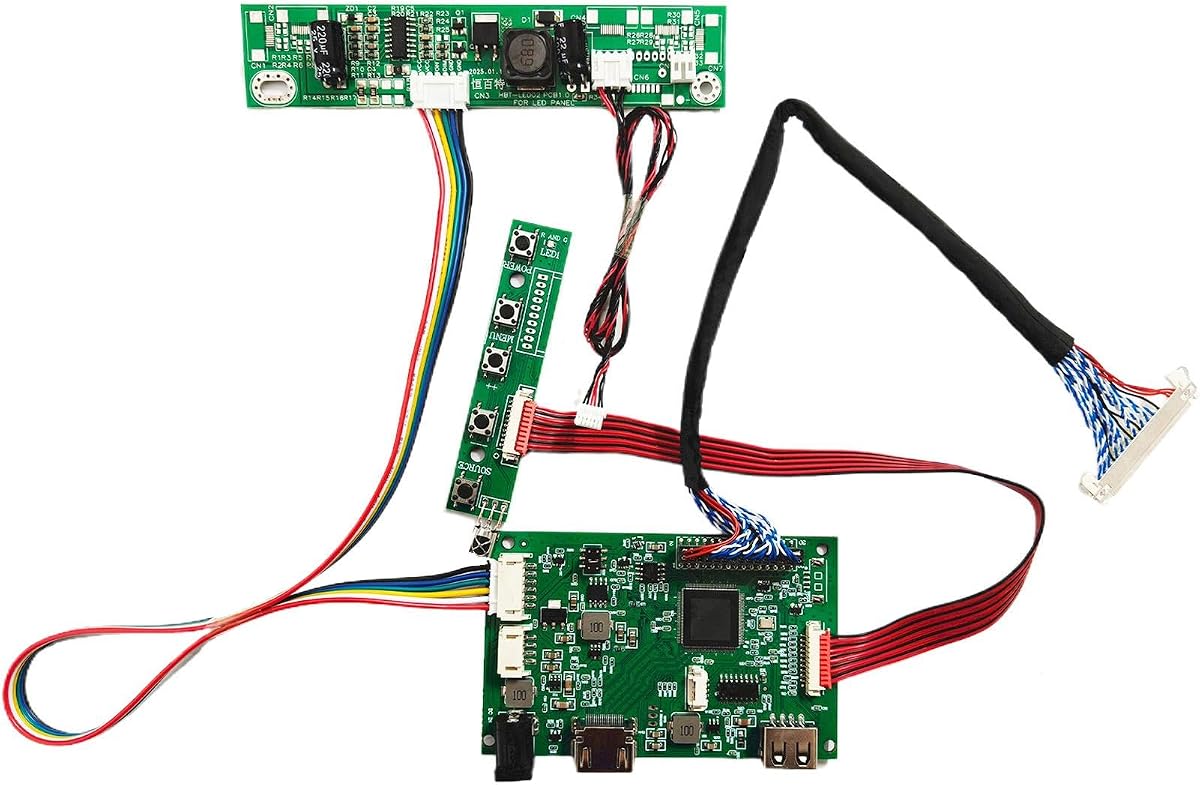
It supports both VGA and DVI inputs which adds flexibility. The included speaker connector simplifies audio setup.
Users must ensure proper power supply to avoid restart issues. The insulated environment note is important for safety.
Cost conscious builders will appreciate the included accessories. It works well for standard 15.6 inch laptop screens.
VGA and DVI inputs allow connection to older computers and consoles easily.
LED lights help identify board status quickly during initial power on tests.
We may earn a commission when you buy through this link, at no additional cost to you.
This board stands out with a perfect rating for larger displays. It supports 1080p resolution well for 21 inch plus sizes.
We may earn a commission when you buy through this link, at no additional cost to you.
The USB playback feature is unique for this price range. It allows direct media viewing without a computer connection.
The 180 degree rotation helps with portrait orientation setups. This adds flexibility for digital signage or vertical use.
Anyone needing modern inputs should consider this model. It delivers high quality performance for 23.8 inch panels.
USB input supports video and picture playback directly from external drives.
Image rotation allows creative setup options beyond standard horizontal display.
We may earn a commission when you buy through this link, at no additional cost to you.
This option focuses on 1080p screens with eDP interfaces. It covers sizes up to 17.3 inches effectively.
We may earn a commission when you buy through this link, at no additional cost to you.
Direct connection simplifies setup significantly without drivers. The LED status light helps verify signal presence.
White screens often mean reversed cables which is a common user error. Checking connections carefully solves most issues.
It is a solid choice for HD panel repairs. Users should confirm pin counts before purchasing.
No software installation is needed to start displaying signals immediately.
Supports models like B156HAN01.1 and N156HGE-EA1 reliably.
We may earn a commission when you buy through this link, at no additional cost to you.
This board is great for 17 inch displays with specific resolution needs. It holds a strong 4.6 rating from users.
We may earn a commission when you buy through this link, at no additional cost to you.
The combination of VGA and DVI inputs is versatile. Audio output support makes it good for media usage.
White or black screens usually indicate connection or power issues. Troubleshooting involves checking jumpers and current.
Buyers with older 1280×1024 screens will find this useful. It offers high reliability for standard monitors.
Speaker connector supports 8ohm 2W audio output directly from the board.
VGA and DVI inputs allow connection to legacy hardware easily.
We may earn a commission when you buy through this link, at no additional cost to you.
This kit adds value by including extra components like the inverter. It suits 21.5 and 23.8 inch screens.
We may earn a commission when you buy through this link, at no additional cost to you.
The touch screen cable is a bonus for compatible panels. It supports high power needs with 3A recommendation.
Specific models like LM215WF3-SLA1 are excluded which is critical to check. Verify your panel number carefully.
It is a complete solution for larger screens. Users get necessary components beyond just the main board.
Includes inverter board and USB cable for touch screens out of the box.
DVI and VGA inputs offer flexibility for desktop and laptop sources.
We may earn a commission when you buy through this link, at no additional cost to you.
This board supports a wide range of FHD panels from 11 to 17 inches. It is field tested for reliability.
We may earn a commission when you buy through this link, at no additional cost to you.
The pre connected cable simplifies setup significantly for users. Technical support is available for compatibility checks.
Troubleshooting advice includes checking power current for restart issues. This helps prevent common installation problems.
Buyers looking for FHD solutions should consider this. It balances flexibility with specific compatibility needs.
Signal cables come pre connected to save time during installation.
Requires 12V 2A to prevent automatic restarting during operation.
We may earn a commission when you buy through this link, at no additional cost to you.
This universal board supports screens up to 65 inches which is rare. It uses the NT68676 chipset effectively.
We may earn a commission when you buy through this link, at no additional cost to you.
HDMI input adds modern connectivity options to the mix. Multi language OSD helps users in different regions.
Complexity can be higher for beginners compared to dedicated boards. Proper pin mapping is essential for success.
Large project enthusiasts will appreciate the flexibility. It is a strong option for big DIY display builds.
The NT68676 chipset ensures stable signal processing for various panels.
Supports multiple languages for easier menu navigation globally.
We may earn a commission when you buy through this link, at no additional cost to you.
This board offers perfect ratings for its media playback features. It works well with 21.5 and 23.8 inch screens.
We may earn a commission when you buy through this link, at no additional cost to you.
Video playback via USB allows independent media viewing. This feature reduces the need for an external computer.
Rotation support adds unique use cases for this kit. It fits well in vertical display scenarios.
Users wanting standalone media viewing should choose this. It delivers high performance for 1080p panels.
USB input allows text video and picture playback without a host PC.
180 degree image rotation supports creative orientation options easily.
We may earn a commission when you buy through this link, at no additional cost to you.
This controller provides HDMI VGA inputs for standard laptop screens. It ensures precise signal transmission for clear images.
We may earn a commission when you buy through this link, at no additional cost to you.
Adjustable parameters allow brightness and color tuning. This helps optimize visual experience for specific content.
Stable operation ensures low current monitoring. It helps prevent hardware overload and extends screen life.
Buyers with 40 pin panels should check this option. It delivers smooth viewing with multiple input support.
Capable of decoding signals with reduced loss for accurate display.
Parameters adjust dynamically to improve vividness and detail clarity.
We may earn a commission when you buy through this link, at no additional cost to you.
Selecting the right board depends on matching your screen panel type and resolution accurately. This guide explains the key factors to verify before purchasing.
Ensure the board supports your screen panel resolution such as 1366×768 or 1920×1080. Mismatched resolution often leads to blank displays or distorted images.
Always verify the panel number against the product list before buying.
Check your screen connector pin type like eDP or LVDS and pin count 30 or 40 pin. The board interface must match the panel input exactly.
Using the wrong pin count will damage the connector or fail to show any picture.
Select inputs based on your source devices such as HDMI VGA or DVI. Some boards also offer USB media playback which adds extra versatility.
Ensure the chosen ports match your computer or console output capabilities.
Most boards need a 12V DC adapter often 2A or higher current to operate without flickering. Verify the port size like 5.5×2.1mm.
Insufficient current can cause restart loops or black screens during operation.
Boards are designed for specific size ranges like 11.6 to 15.6 inch or larger monitors. Verify the size compatibility to ensure proper signal drive.
Larger screens require more current and specific controller capabilities.
Some kits include signal cables and adapters while others require separate purchases. Check the packing list to avoid missing parts.
Pre connected cables simplify installation significantly for beginners.
If you need sound the look for boards with speaker connectors. These allow direct audio output to external speakers or headphones.
Boards without audio support need a separate sound card setup.
LED lights help troubleshoot power and signal issues quickly. Look for boards that show clear green or red status lights.
Visual feedback saves time when testing connections after setup.
Connect the signal cable to the board and screen panel ensuring Pin 1 alignment. The red circle on the board marks the correct start point for the ribbon cable.
Plug in the DC power adapter matching the required voltage and current. Turn on the board to check if the LED light shows green before connecting input sources.
Keep the board in a ventilated insulated area to avoid overheating. Regularly check connections for dust or wear to maintain stable performance over time.
An LCD Controller Board for Laptop Screen acts as the interface between video signals and the display panel. It processes inputs like HDMI or VGA to drive the LCD correctly without a laptop motherboard.
You can find the model number printed on the back of the LCD panel. Look for codes like LP156WH4 or B156HAN01.1 which define resolution and interface type.
Most LCD controller boards do not need driver installation. They are plug and play devices that process signals directly once connected properly to power and screen.
A black screen often means wrong cable connection or insufficient power supply. Check pin alignment and verify that your adapter provides enough current like 2A.
Yes many boards support standard LCD TV panels with matching interface types. Always confirm resolution and pin count compatibility before purchasing the kit.
Use a 12V DC adapter matching the board port size like 5.5×2.1mm. Ensure it provides at least 2A or 3A current depending on the model specifications.
We covered ten top rated LCD Controller Board for Laptop Screen options from budget to premium choices. Each model offers specific features suited to different panel needs.
Prioritize matching resolution and interface type over other factors. The right board ensures stable signals and better performance for your DIY projects.
Prices and stock change regularly so check current details on the links. Verify your screen panel number before purchasing to avoid compatibility issues.