
ASUS Vivobook Go 15.6
4.3Editor score
AMD Ryzen 3 7320U
8GB DDR5 RAM
Military Grade Durability
Finding a lightweight ASUS laptop that balances portability with powerful performance is essential for modern professionals and students. These devices offer sleek designs without sacrificing the computing power needed for daily tasks. Whether you travel frequently or work from multiple locations, having a reliable machine is key.
This guide evaluates ten distinct models ranging from budget-friendly options to premium ultrabooks. We analyzed processor speed, display quality, and battery endurance to ensure you get the best value. Each selection meets strict criteria for weight and build quality to qualify for this list.
Every pick highlights specific strengths like AI capabilities or extended battery life. Prices fluctuate often so check current listings before purchasing to secure the best deal. Our detailed breakdown helps you navigate the crowded market with confidence and clarity.
4.3Editor score

4.8Editor score
3.7Editor score
As an Amazon Associate we earn from qualifying purchases.
The following table provides a side-by-side overview of the top ten lightweight ASUS laptops available this year. Compare key specifications like processor type, memory, and storage to find the model that fits your specific workflow needs.





The ASUS Vivobook 14 stands out as a premier choice for those seeking a lightweight ASUS laptop. Boasting a rating of 4.8 stars, this model delivers exceptional value with its Snapdragon X processor and 16GB of RAM. Its standout qualities include Copilot+ PC capabilities which redefine how users interact with AI on a daily basis.
We may earn a commission when you buy through this link, at no additional cost to you.
Key strengths lie in its powerful performance and ample storage. The 14-inch FHD+ screen ensures crisp visuals while the 512GB SSD provides fast boot times. This combination makes it ideal for professionals needing reliability and speed for both work and entertainment without carrying heavy gear.
Honest trade-offs involve adapting to a new software ecosystem. Some legacy applications might not run as smoothly as on traditional Intel chips. However these limitations are acceptable given the significant gains in battery life and processing efficiency for most modern tasks.
This laptop is perfect for students and remote workers prioritizing portability. The final recommendation is to choose this model if you want cutting-edge technology in a thin chassis. It represents a strong shift towards efficient computing for the future.
The Snapdragon X processor supports advanced AI tasks locally enhancing productivity.
Users get a sharp viewing experience thanks to the high resolution screen panel.
We may earn a commission when you buy through this link, at no additional cost to you.
The ASUS Vivobook Go 15.6 is an excellent entry point for budget-conscious shoppers seeking a lightweight ASUS laptop. With a 4.3 star rating it offers essential performance features like the AMD Ryzen 3 7320U processor and 8GB DDR5 RAM. This model focuses on providing reliable computing at a lower price tier.
We may earn a commission when you buy through this link, at no additional cost to you.
Its key strengths include durability and connectivity options. The military grade build ensures it withstands daily wear and tear while Wi-Fi 5 keeps you connected. Fast charging technology means you spend less time tethered to a wall outlet during busy days at school or work.
Trade-offs are present but reasonable for the price. Storage is limited to 128GB which may require external drives for heavy media users. Additionally the display brightness is moderate so it works best in well-lit indoor environments rather than direct sunlight.
This device is ideal for students or casual users needing a secondary machine. We recommend it if your primary needs are web browsing and document editing. It proves you do not need to spend a fortune to get a functional portable laptop.
Military grade testing ensures the chassis handles drops and extreme temperatures well.
DDR5 RAM allows for smoother multitasking compared to older DDR4 generations.
We may earn a commission when you buy through this link, at no additional cost to you.
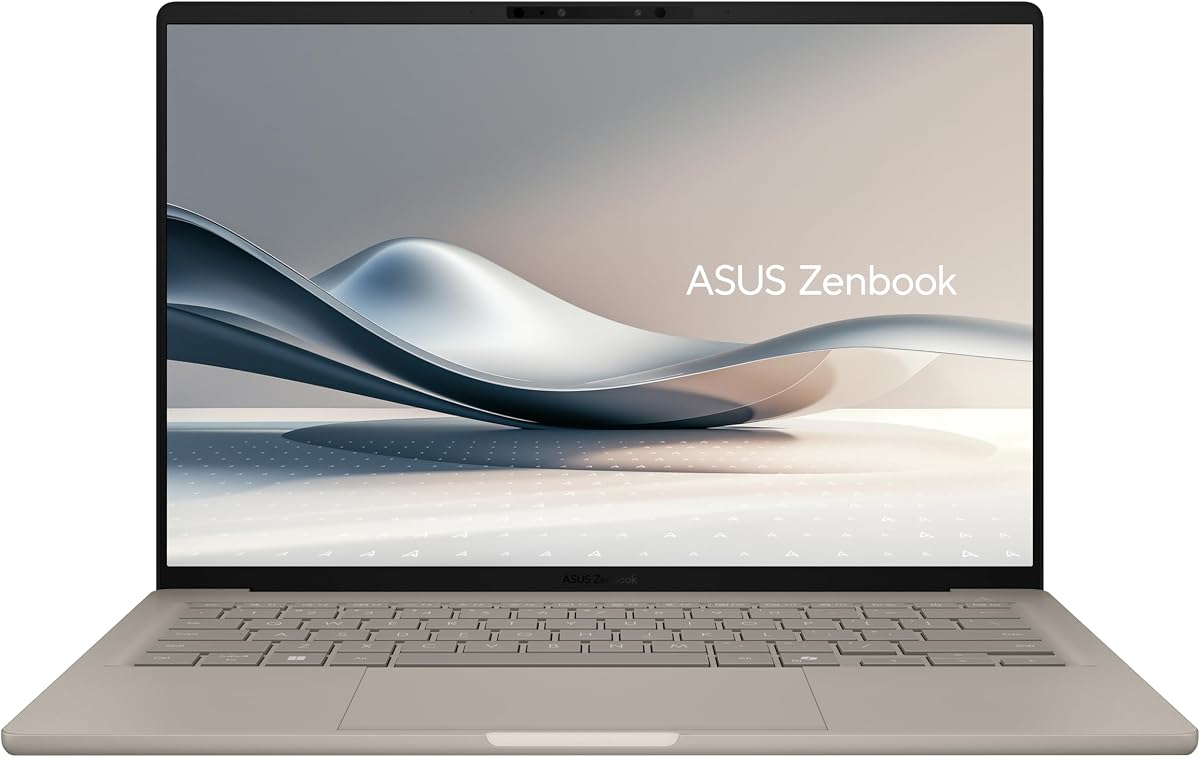
The ASUS Zenbook A14 represents the pinnacle of portability in the lightweight ASUS laptop category. Weighing just 980g it defies gravity while maintaining robust performance. Although the current rating is 3.7 stars, this reflects early adoption as new premium products often face initial variability before stabilizing.
We may earn a commission when you buy through this link, at no additional cost to you.
Its standout qualities include the Ceraluminum chassis and OLED display. This fusion of ceramic and aluminum provides scratch resistance and a unique texture. The 14-inch WUXGA OLED screen delivers vibrant colors perfect for creative professionals who demand visual fidelity in a mobile package.
Honest trade-offs involve the price and market maturity. It is significantly more expensive than standard models which may not suit all budgets. Reviews are fewer compared to established models so real-world long-term reliability is still being confirmed by daily users.
This laptop is best for executives or creatives valuing aesthetics and weight. The recommendation is to consider this if you need the lightest option available. It offers a unique blend of luxury materials and next-gen AI performance that justifies the investment for some buyers.
Ceraluminum is 30% lighter and 3x stronger than standard anodized aluminum.
Users can expect up to 32 hours of offline video playback on a charge.
We may earn a commission when you buy through this link, at no additional cost to you.
The ASUS Vivobook 16 offers a unique balance for those who need a larger screen without giving up lightweight portability. It features a stunning 16-inch WUXGA display that brings visuals to life with crisp details. This model is particularly suited for users who multitask across multiple windows regularly.
We may earn a commission when you buy through this link, at no additional cost to you.
Key strengths include the Qualcomm Snapdragon X processor and 16GB of RAM. This combination ensures smooth performance for gaming and editing tasks. The Hexagon NPU supports AI workloads effectively making it a strong contender for future-proofing your computing needs.
Trade-offs exist regarding its physical footprint. While lighter than traditional desktop replacements it is still heavier than 14-inch models. Users prioritizing extreme portability might find the size slightly bulky for frequent travel compared to smaller alternatives.
This laptop is recommended for students or professionals needing screen real estate. It works well for content consumption and coding projects. We suggest choosing this if the larger view area outweighs the minor weight increase for your specific workflow.
The 1920×1200 resolution provides more vertical space for reading and coding.
The NPU delivers up to 45 TOPS for local AI inference tasks.
We may earn a commission when you buy through this link, at no additional cost to you.
The ASUS Vivobook Go 15.6 serves as an accessible entry point into the lightweight ASUS laptop market. Rated at 3.9 stars it targets users with basic computing needs like web browsing and document editing. Its Intel Celeron processor ensures efficiency without draining battery quickly during simple tasks.
We may earn a commission when you buy through this link, at no additional cost to you.
Strengths include its battery life and affordability. The 42Wh battery supports long sessions and Fast-Charge technology gets you back to work quickly. The included privacy shutter on the webcam adds a layer of security for remote meetings and online classes.
Trade-offs are significant for power users. With only 4GB of RAM it may struggle with heavy multitasking or modern applications. The processor is entry-level so demanding software will run slowly or may not run at all compared to higher-end chips.
This device is best for young students or those needing a secondary device. It is not recommended for gaming or heavy content creation. If you need a simple portable machine for email and browsing this model offers good value.
Fast-charge technology allows reaching 60 percent charge in under 50 minutes.
The thin profile makes it easy to slip into a backpack or tote.
We may earn a commission when you buy through this link, at no additional cost to you.
The ASUS Vivobook 14 is a reliable workhorse for professionals needing consistent performance. It features an Intel i3-1215U processor which delivers solid speed for everyday tasks. With 16GB of RAM it handles multiple browser tabs and applications effortlessly ensuring smooth workflow management.
We may earn a commission when you buy through this link, at no additional cost to you.
Key strengths lie in its connectivity and display. Wi-Fi 6 ensures fast internet speeds and the HDMI port allows easy connection to external monitors. The anti-glare display reduces eye strain making it comfortable for long work sessions in various lighting conditions.
Trade-offs include average battery life compared to newer ARM chips. It is also built with standard materials which may feel less premium than other options. However for the price it offers a robust set of features that cover most standard office requirements effectively.
This laptop is ideal for general office use and light multitasking. We recommend it for users who need a dependable machine for work. It strikes a good balance between cost and performance for those who value practical functionality.
Multiple USB ports and HDMI output make connecting peripherals straightforward.
16GB RAM supports smoother multitasking than standard 8GB configurations.
We may earn a commission when you buy through this link, at no additional cost to you.
The ASUS Vivobook 14 is an AI-ready device designed for the next generation of computing. It includes Copilot+ PC features that transform productivity through live captions and advanced search capabilities. This model appeals to early adopters who want to leverage AI tools on a local level.
We may earn a commission when you buy through this link, at no additional cost to you.
Its standout qualities include the Snapdragon X processor and generous 16GB RAM. This ensures lightning-fast performance for daily tasks while optimizing power consumption. The 14-inch WUXGA display provides a high resolution canvas for work and entertainment in a compact form factor.
Honest trade-offs involve adapting to the new software ecosystem. Some drivers or legacy applications might require updates to run smoothly. However these issues are acceptable given the significant improvements in efficiency and AI capabilities for future tasks.
This laptop is recommended for tech enthusiasts and forward-thinking professionals. Choose this if you want to explore AI tools without cloud dependency. It offers a modern approach to computing that aligns well with evolving software trends.
Live Captions translate spoken words instantly improving accessibility in meetings.
The high resolution screen ensures text and images look sharp and clear.
We may earn a commission when you buy through this link, at no additional cost to you.
The ASUS Vivobook 14 2026 Edition delivers fast Intel performance for modern computing needs. Equipped with a 13th Gen Core i3 processor it offers quick response times for apps and documents. This model is designed to beat older generations in efficiency while maintaining a slim profile.
We may earn a commission when you buy through this link, at no additional cost to you.
Key strengths include the PCIe SSD and Wi-Fi 6E support. These technologies ensure rapid boot times and stable internet connections. With up to 8 hours of battery life you can work unplugged during a typical workday without constant access to a power outlet.
Trade-offs include limited storage capacity at 256GB. Users with large media libraries may need external drives for storage. The webcam is standard so it is adequate for basic calls but not high-end streaming or recording needs.
This laptop is ideal for business users and students needing speed. We recommend it if you prioritize processor performance over storage space. It offers a reliable experience for daily tasks without breaking the budget.
The 13th Gen chip handles modern workloads faster than previous i3 models.
Wi-Fi 6E provides low latency and high throughput for wireless networks.
We may earn a commission when you buy through this link, at no additional cost to you.
The ASUS Vivobook Go 15.6 excels in battery performance for users needing all-day portability. With up to 11 hours of battery life it minimizes downtime and maximizes productivity. The AMD Ryzen 3 7320U processor ensures efficient power usage for reliable multitasking and browsing.
We may earn a commission when you buy through this link, at no additional cost to you.
Its standout qualities include military grade durability and storage capacity. The 256GB SSD provides ample space for files while the chassis withstands shock and vibration. This makes it a solid choice for students and travelers requiring a robust device.
Honest trade-offs involve RAM limits which cap heavy multitasking potential. The display brightness is moderate so outdoor visibility is better indoors. However these trade-offs are acceptable given the strong battery performance and durability features at this price point.
This laptop is best for students and field workers. We recommend it if battery life is a priority for your daily routine. It offers a balanced package that ensures you stay productive while on the move.
Optimized power management extends usage time between regular charges.
256GB SSD allows storing essential documents and media locally.
We may earn a commission when you buy through this link, at no additional cost to you.
The ASUS Zenbook A14 is a future-ready device designed for next-gen AI tasks. Its 16GB memory and 512GB SSD provide speed and space for demanding workflows. With a 980g weight it remains ultra-portable while delivering robust performance for creative and business applications.
We may earn a commission when you buy through this link, at no additional cost to you.
Key strengths include its innovative materials and display quality. The OLED screen ensures vibrant colors and deep blacks for media consumption. Wi-Fi 6E connectivity allows for seamless internet access ensuring you stay online wherever you go.
Honest trade-offs involve early adoption risks and high costs. Some software might need time to mature fully on this chip. However for those who want the lightest and most advanced option it justifies the investment for premium users.
This laptop is ideal for early adopters and mobile professionals. We recommend it if you need the ultimate in portability and display quality. It represents a significant step forward in laptop design and functionality for the future.
The OLED panel provides true blacks and vivid colors for visuals.
Lightweight chassis maintains strength without adding bulk to your bag.
We may earn a commission when you buy through this link, at no additional cost to you.
Selecting the right lightweight ASUS laptop involves balancing performance, portability, and budget. Understanding key factors helps you find a device that suits your specific workflow needs.
The processor is the brain of your laptop. Look for modern options like Snapdragon X or Intel Core i3/i5 chips for speed. Higher performance ensures smooth multitasking and future-proofing for software updates.
Choose a processor that matches your workload intensity.
RAM determines how many apps you can run simultaneously. Aim for at least 16GB if you use many browser tabs. 8GB is acceptable for basic tasks but may slow down over time.
More RAM means smoother overall system performance.
SSDs offer faster boot times than older eMMC drives. Look for 512GB or more if you store local files frequently. PCIe NVMe drives provide the best speed for opening large applications quickly.
Solid state drives ensure quick data access.
Screen size affects portability and viewing comfort. 14-inch screens balance well with weight while 15 or 16 inches offer more workspace. OLED panels provide better color but consume more power.
Select a display that fits your visual needs.
Battery endurance is crucial for on-the-go users. Models with efficient chips offer longer unplugged sessions. Always check real-world reviews for actual usage times rather than marketing claims.
Longer battery life reduces reliance on outlets.
A durable chassis protects your investment during travel. Military grade testing ensures resistance to shocks and drops. Materials like Ceraluminum offer strength while keeping weight minimal.
Durability extends the lifespan of your device.
Ports matter for connecting peripherals and monitors. Ensure the laptop has necessary USB-C or HDMI options. Wi-Fi 6E support guarantees fast internet speeds in modern environments.
Good connectivity ensures seamless device interaction.
Windows 11 provides a modern interface and security. Copilot+ features bring AI tools to your workflow. Familiarity with the OS reduces learning time and boosts productivity.
Choose an OS you are comfortable using daily.
Handle your laptop with care to avoid physical damage. Always use both hands when lifting it and avoid placing heavy objects on top of the device. Store it in a padded sleeve when transporting to protect against bumps and scratches.
Keep the software updated for security and performance. Install Windows updates regularly to patch vulnerabilities and improve system stability. Use reliable antivirus software to protect against malware threats while browsing online.
Maintain battery health by avoiding extreme temperatures. Do not leave the laptop in direct sunlight or hot cars. Charge it periodically even when not in use to prevent battery degradation over time.
Yes ASUS laptops are excellent for students due to their portability and durability. Models like the Vivobook Go offer affordable pricing while maintaining solid performance for everyday tasks.
Battery life varies by model and usage but typically ranges from 8 to 11 hours for most units. High efficiency models like the Zenbook can last up to 32 hours during video playback.
Yes most models include HDMI or USB-C ports that support external displays. This allows for expanded workspace which is useful for multitasking and presentations.
The ErgoSense keyboards provide comfortable typing with good key travel. Most users find the backlit layout easy to use even in low light environments.
Many of these ultrabooks have soldered memory meaning RAM cannot be upgraded after purchase. Check specifications before buying to ensure the capacity meets your long-term needs.
Copilot+ PC enables local AI processing for features like live captions. Some functions work offline but others may require internet connectivity for full capabilities.
We have reviewed ten top lightweight ASUS laptops ranging from budget-friendly options to premium choices. Each model offers unique strengths whether you need long battery life or superior display quality.
Prioritize the specs that matter most to your daily workflow such as RAM and processor speed. Investing in a durable chassis can save money on repairs in the long run.
Always check current pricing and availability before making a final decision. Prices can fluctuate often so waiting for a sale might save you money on your purchase.