
2026 Mac OS Shortcuts Sticker for MacBook Neo, Air & Pro (1-Pack)
4.6Editor score
52 essential shortcuts
Residue-free adhesive
Water repellent vinyl
Your new MacBook Neo is a powerful machine that deserves top-tier protection and functionality. Choosing the right accessories ensures your device stays safe while boosting productivity and enhancing your workflow across various environments.
We evaluated the leading options available this month by focusing on compatibility, build quality, and user feedback. Our list covers essential items like protective cases, connectivity hubs, and privacy screens designed specifically for the 2026 model.
Each pick highlights key features and real-world performance to help you decide quickly. Note that availability and pricing fluctuate frequently so verify details before clicking through to make your purchase online today.
4.6Editor score
4.6Editor score

4.2Editor score
As an Amazon Associate we earn from qualifying purchases.
Explore our detailed side-by-side comparison of the top ten accessories designed to enhance your MacBook Neo experience with protection and connectivity.


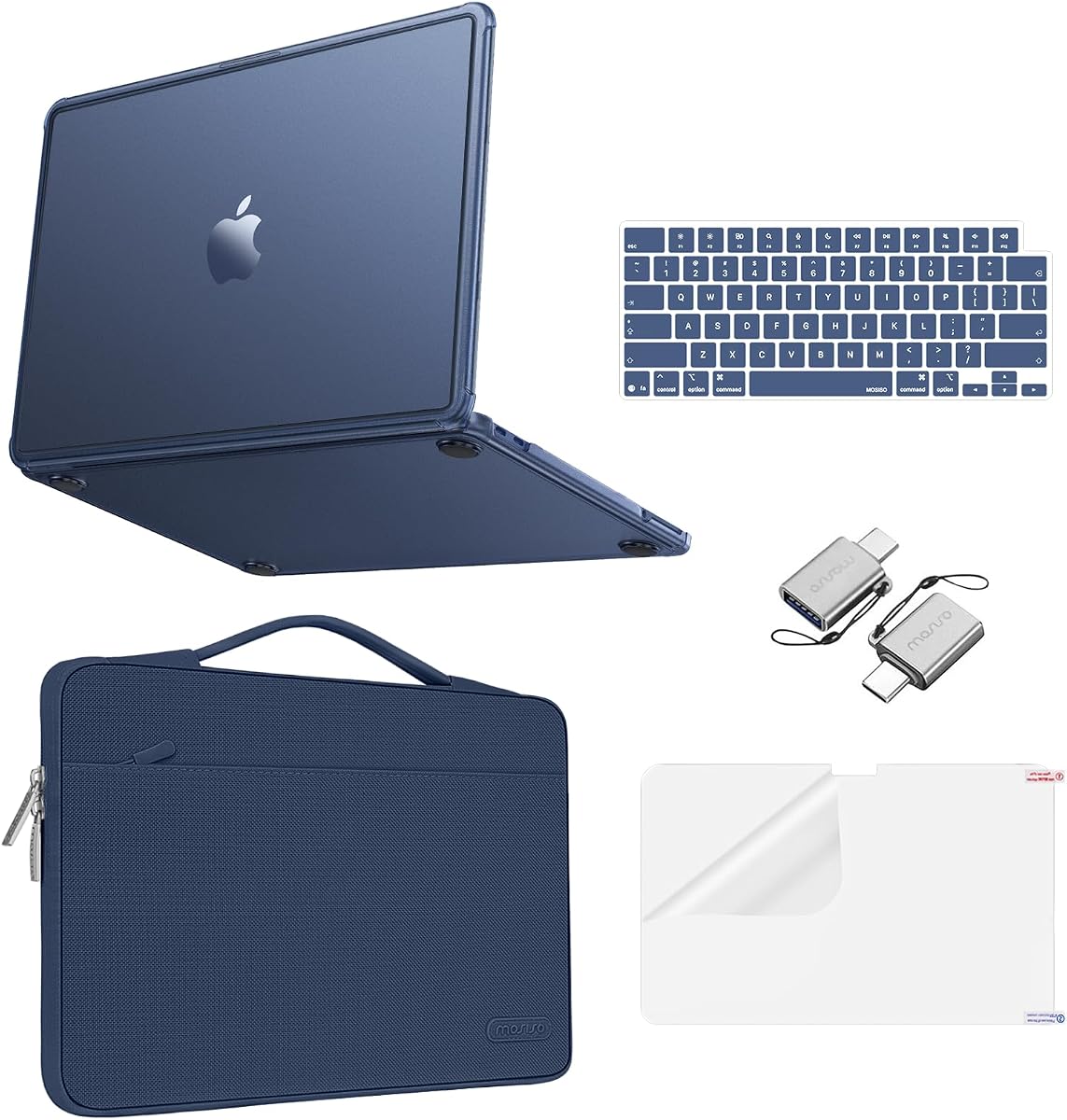
This MOSISO option stands out as a top choice for daily protection with its engineered matte finish and comprehensive accessory bundle.
We may earn a commission when you buy through this link, at no additional cost to you.
The fingerprint-resistant surface keeps your device looking pristine while the included sleeve offers robust protection for transit and storage needs.
Although the sleeve adds some bulk it ensures your laptop survives rougher handling which is often worth the slight trade-off in portability.
It is ideal for professionals and students who need reliable full-body security without sacrificing style or ease of use on the go.
The matte surface actively repels smudges keeping your device clean with minimal effort during long work sessions.
Includes a protective sleeve keyboard covers and screen protector to cover all bases right out of the box.
We may earn a commission when you buy through this link, at no additional cost to you.
This simple sticker sheet provides instant workflow boosts by placing essential commands right where you can see them while typing.
We may earn a commission when you buy through this link, at no additional cost to you.
The vinyl is durable and water resistant ensuring it survives spills and daily wear without peeling or losing its crisp print quality.
Removing it later leaves no glue marks on your palm rest making it a risk-free option for those who change up their workspace often.
Students and new users will appreciate the low cost and clear layout that helps them master their device without expensive training tools.
52 curated shortcuts help you work faster by removing the need to search for commands online during critical work moments.
The residue-free adhesive ensures your MacBook remains damage free even if you decide to remove the sticker after a few months.
We may earn a commission when you buy through this link, at no additional cost to you.
For power users this hub delivers exceptional data transfer rates and video output capabilities that exceed standard USB-C dongles significantly.
We may earn a commission when you buy through this link, at no additional cost to you.
The detachable magnetic connector offers convenience and the high wattage charging ensures your laptop stays powered even when connected to multiple devices.
Note that a bottom case may interfere with the connection which is a key consideration if you prefer full enclosure protection for your device.
Creators and IT professionals will value the high refresh rate support and massive bandwidth for heavy data and video workflows daily.
80Gbps bandwidth allows for rapid file transfers and supports high-resolution displays without lag or stuttering.
140W PD charging ensures your laptop remains powered up while you run multiple high draw peripherals off the single hub.
We may earn a commission when you buy through this link, at no additional cost to you.
This clear hard shell keeps your MacBook Neo looking brand new while protecting it from scratches and minor bumps in transit.
We may earn a commission when you buy through this link, at no additional cost to you.
The high-transparency material resists yellowing over time which maintains the aesthetic value of your device during heavy daily use.
It comes with a full protection kit including keyboard covers and a screen protector to ensure every surface is shielded effectively.
Users who prefer a minimalist look will appreciate how slim the case remains while still offering durable protection against daily wear.
The polycarbonate material is engineered to resist discoloration keeping your case looking fresh and transparent for longer.
Includes dust covers keyboard covers and screen protector for total defense against debris and spills during everyday use.
We may earn a commission when you buy through this link, at no additional cost to you.
This puffy sleeve adds a unique aesthetic while providing a soft layer of cushioning for your laptop inside your backpack or briefcase.
We may earn a commission when you buy through this link, at no additional cost to you.
The plush interior effectively cushions your device against bumps and scratches making it a great secondary layer of protection on the go.
Its front pocket allows for quick access to cables or chargers which keeps your bag organized and your workspace ready for action.
It is perfect for travelers who want a lightweight stylish option that can slide easily into an existing bag without adding much bulk.
The quilted square pattern gives the sleeve a modern look that stands out from standard generic laptop bags everywhere.
The plush interior lining absorbs shocks and prevents scratches ensuring your device arrives safely at your destination.
We may earn a commission when you buy through this link, at no additional cost to you.
Designed for slimness this case offers essential protection without adding significant weight making it perfect for daily commuters and students.
We may earn a commission when you buy through this link, at no additional cost to you.
The transparent design showcases the original color of your MacBook Neo while shielding it from scratches and minor scuffs effectively.
It includes a keyboard cover and USB adapter which adds value and convenience for those who need quick connectivity for peripherals.
If you prioritize mobility and a sleek look over heavy duty armor this is an excellent choice for lightweight everyday protection.
The transparent material allows your device color to show through clearly maintaining the clean design of the laptop.
Includes a versatile USB-C to USB-A adapter to connect legacy devices without needing an extra purchase immediately.
We may earn a commission when you buy through this link, at no additional cost to you.
This privacy screen uses magnets to attach quickly protecting your data from prying eyes in public spaces like cafes and airports.
We may earn a commission when you buy through this link, at no additional cost to you.
It limits the viewing angle to 30 degrees which ensures only the person sitting directly in front can see your screen content clearly.
The anti-blue light feature helps reduce eye strain during long work sessions making it a healthy addition to your daily workflow.
Remote workers and frequent travelers should consider this item to keep sensitive information private while working in shared environments.
Strong magnets allow you to attach or remove the screen in seconds without adhesive residue or damage to your display.
Built-in anti-blue light and anti-glare properties help reduce visual fatigue during extended hours of screen usage.
We may earn a commission when you buy through this link, at no additional cost to you.
This premium filter uses imported materials to reduce blue light significantly helping to protect your eyes from strain and fatigue over time.
We may earn a commission when you buy through this link, at no additional cost to you.
The reinforced magnetic strip ensures the screen stays aligned and secure throughout the day without slipping out of place easily.
It maintains high definition clarity so you do not sacrifice screen quality for privacy making it suitable for creative professionals.
People who spend long hours on their laptops will benefit from the eye care features and solid privacy protection it offers daily.
Imports high quality filters that block up to 95% of blue light to help reduce eye strain during long work days.
Reinforced magnetic strips keep the screen aligned correctly so you can work without worrying about it shifting.
We may earn a commission when you buy through this link, at no additional cost to you.
This US made sticker helps you master Mac commands by keeping key shortcuts visible so you learn them faster through repetition.
We may earn a commission when you buy through this link, at no additional cost to you.
The laminated vinyl ensures it stays sharp and durable against daily use making it a practical learning aid for any Mac user.
It has a strong adhesive hold but may leave a light residue on removal that wipes off easily with warm soapy water.
Whether you are a student or professional this tool simplifies your workflow by putting essential commands right at your fingertips.
Lamination protects the print from wear and tear ensuring the shortcuts stay visible and legible for months of use.
The adhesive is formulated to keep the sticker in place securely even with frequent typing and hand movement.
We may earn a commission when you buy through this link, at no additional cost to you.
This seven piece set of silicone plugs ensures every port on your MacBook Neo stays free from dust and debris when not in use.
We may earn a commission when you buy through this link, at no additional cost to you.
The silicone material is flexible and durable allowing easy insertion and removal without scratching the metal ports or leaving residue.
The low profile design ensures the plugs sit flush with the device so you do not notice them when your laptop is closed.
Anyone who frequently travels or keeps their laptop in a dusty environment should add these small protectors to their accessories list today.
The kit covers USB-C HDMI and SDXC ports ensuring no opening is left vulnerable to dust or debris buildup.
Flexible silicone ensures the plugs stay securely in place during transport without popping out or loosening easily.
We may earn a commission when you buy through this link, at no additional cost to you.
Choosing the right accessories requires balancing protection style and functionality to match your specific work habits and environment.
Always verify the model number before buying any case or screen protector to ensure a perfect fit for your MacBook Neo.
Look for products that specify the A3404 model number and 2026 release date to avoid mismatched accessories.
Choose high-grade materials like polycarbonate for cases or tempered glass for protectors to ensure long-lasting durability and safety.
Check product descriptions for features like fingerprint resistance or scratch resistance to maintain your device appearance.
If you use your laptop in dusty environments prioritize accessories that protect open ports from debris accumulation over time.
Consider kits that include dust plugs to keep your connectivity points clean without adding bulk to your device.
Work in public spaces like coffee shops or offices you may benefit from privacy screen protectors that block side angles.
Opt for magnetic designs to avoid adhesive residue and allow easy removal when you are working in private environments.
Expand your device capabilities with USB-C hubs that support high wattage charging and fast data transfer speeds for your needs.
Ensure any adapter you choose supports your monitor resolution and refresh rate requirements for seamless media workflows.
Select products that offer tool-free installation such as snap-on cases or magnetic screens to save time and prevent damage.
Review user feedback on fit and alignment to ensure the accessory mounts securely without wobbling or slipping.
Consider whether you prefer a minimalist clear look or a stylish matte finish that matches your personal work environment.
Choose colors and textures that enhance your device without obscuring the original design elements of your MacBook.
Look for kits that include multiple accessories like keyboard covers screen protectors and cases to save money and simplify buying.
Verify that all included items match your device size and model to avoid receiving incompatible parts in the package.
Clean your accessories regularly with a soft dry cloth to remove dust and smudges that can build up over time.
Remove cases and protectors occasionally to wipe down your laptop directly and ensure no debris is trapped underneath the material.
Store your laptop in a clean dry place when not in use to prevent moisture or mold from damaging your protective gear.
While the device is durable a case helps prevent scratches and minor bumps during travel. It is especially useful if you carry your laptop daily in a bag.
Yes high quality hubs are safe provided they match your device power requirements. Check the wattage and compatibility before connecting any external adapter.
Clean it weekly with a microfiber cloth to maintain visibility and remove oils. Avoid harsh chemicals that could damage the coating or adhesive.
Most items listed are specifically designed for the 2026 MacBook Neo 13 inch model. Always check the product title and specs before purchasing to ensure compatibility.
They are useful if you work in dusty areas or travel frequently. They keep ports clean and can prevent small debris from causing connectivity issues later.
High quality silicone covers are safe and can protect against spills. Just ensure they are thin enough to not interfere with typing comfort or trackpad use.
The top picks offer a range of protection and utility options from budget friendly stickers to premium connectivity hubs for power users.
Focus on what matters most to your workflow like privacy or port protection when narrowing down your final selection for purchase.
Prices and availability may change so check the current listings on Amazon before completing your order to secure the best deal today.