
VPFET HDMI Audio Extractor 4K HDMI to Optical
4.1Editor score
Affordable price point
Supports 4K resolution
Optical output included
This comprehensive guide compares the top ten HDMI audio extractors available in October 2026, evaluating their features, compatibility, and performance for
Finding the right HDMI audio extractor can transform your home entertainment experience by unlocking high-quality sound from modern devices. These compact adapters solve the common problem of limited audio output ports on televisions and gaming consoles.
We evaluated ten leading models based on resolution support, audio format compatibility, and ease of setup. Our analysis focuses on real-world performance with popular sources like consoles, streaming sticks, and computers.
Each pick highlights specific strengths for different budgets and needs, from budget-friendly options to premium 8K capable units. Please note that product availability and pricing may fluctuate over time.
4.1Editor score

4.2Editor score

4.4Editor score
This side-by-side comparison highlights key specifications for all ten models to help you quickly identify which unit meets your specific technical requirements.






The OREI 8K@60Hz Audio Extractor stands out as the top choice for users planning future upgrades. It supports 8K@60Hz and 4K@120Hz video pass-through, ensuring compatibility with next-gen gaming consoles and media players. This model handles HDR10, Dolby Vision, and HLG pass-through effectively.
We may earn a commission when you buy through this link, at no additional cost to you.
Key strengths include ARC support and CEC bypass functionality, which allow volume control and signal detection between devices. The heavy-duty metal enclosure helps maintain stable performance during long usage sessions. It accepts inputs from various sources including consoles and streaming devices.
Trade-offs include a higher price compared to basic 4K models and the lack of eARC support. These are acceptable given the target audience usually prioritizes video bandwidth and future-proofing over advanced audio return features.
This unit is ideal for home theater enthusiasts seeking a versatile extractor that supports the latest HDMI 2.1 features. We recommend it for users who need reliable 8K video pass-through while extracting audio.
This unit prepares your setup for upcoming 8K content by handling high bandwidth video signals without dropping frames.
ARC support allows the extractor to work with TVs that send audio back through the HDMI cable, simplifying connections.
We may earn a commission when you buy through this link, at no additional cost to you.
The VPFET HDMI Audio Extractor offers an accessible entry point for users needing audio separation on a budget. It supports 4K@30Hz video pass-through and includes both optical and 3.5mm analog outputs. This makes it suitable for older sound systems or basic setups.
We may earn a commission when you buy through this link, at no additional cost to you.
Its affordability is a major strength alongside reliable 4K support. The device supports DTS 5.1 via the optical port, which is rare at this price range. It also includes a USB port for power which allows for flexible connection options.
Limitations include the lack of ARC support meaning it cannot extract audio from TV return channels directly. Additionally it requires a USB power connection which adds a slight installation step. These drawbacks are minor for the price.
We recommend this model for users on a tight budget who need to extract audio from game consoles or streaming sticks. It provides essential functionality without unnecessary cost.
This unit delivers the essential features needed to separate audio from 4K video sources without a high cost.
The inclusion of both optical and analog outputs ensures compatibility with a wide variety of speakers and receivers.
We may earn a commission when you buy through this link, at no additional cost to you.
The OREI HDMI Audio Extractor ARC is a premium choice for users with ARC-enabled TVs. It supports 4K@60Hz video pass-through and includes advanced features like downmixing and CEC. This allows for seamless audio extraction directly from the television's HDMI port.
We may earn a commission when you buy through this link, at no additional cost to you.
Standout features include HDR10 and Dolby Vision pass-through ensuring video quality remains high. The device downmixes 5.1 audio to 2.0 PCM for analog outputs while preserving multichannel audio on optical outputs. CEC functionality enables control integration with source devices.
The main drawback is a price point higher than standard 4K extractors. However the added convenience of ARC support justifies the cost for many users. It bridges the gap between basic adaptors and advanced AV gear.
This model is best suited for users with modern TVs who need to route audio to external speakers. It provides a reliable high-quality solution for complex audio setups.
ARC support allows you to connect directly to your TV's HDMI port eliminating the need for extra audio cables.
Downmixing features ensure compatibility with stereo systems while retaining multi-channel audio for capable receivers.
We may earn a commission when you buy through this link, at no additional cost to you.
The OREI 4K@60Hz Converter provides a sturdy solution for extracting audio from high-definition sources. It supports video pass-through up to 4K@60Hz and complies with HDCP 2.2 standards for protected content. The metal housing ensures durability and helps dissipate heat.
We may earn a commission when you buy through this link, at no additional cost to you.
Key strengths include support for Dolby Digital and DTS 5.1 via the optical output. The device also accepts a dual voltage supply making it suitable for international travel. Plug-and-play installation makes it easy to set up quickly.
Drawbacks include the absence of ARC support limiting its use with modern TVs. It also maxes out at 4K resolution which may not suffice for future upgrades. These limitations are acceptable for users focused on current gen consoles.
We recommend this model for users who prioritize build quality and video resolution. It is a reliable choice for connecting gaming consoles to external audio systems.
The metal housing provides physical protection and helps maintain stable internal temperatures during extended use.
This unit supports a wide range of audio formats including Dolby and DTS ensuring compatibility with most home theater systems.
We may earn a commission when you buy through this link, at no additional cost to you.
The eSynic Professional Audio Extractor focuses on high-fidelity analog audio for users with eARC enabled TVs. It supports sampling rates up to 192KHz ensuring clean sound quality. This unit is specifically designed to work with TV ARC ports.
We may earn a commission when you buy through this link, at no additional cost to you.
Strengths include its ability to extract high-resolution PCM audio directly from the TV. The device includes audio signal indicators to help users verify connection status. Setup is straightforward and requires no additional drivers.
Limitations include the lack of optical output which may restrict compatibility with some receivers. Users must configure TV audio settings to PCM for it to function correctly. These requirements are specific but manageable.
This model is ideal for users seeking high-quality analog audio from modern TVs. It excels at converting digital signals into clean stereo sound for speakers.
The high sampling rate ensures that audio signals are converted to analog with minimal loss of detail or clarity.
Designed specifically for eARC ports this unit leverages the bandwidth of modern HDMI connections for better audio extraction.
We may earn a commission when you buy through this link, at no additional cost to you.
The J-Tech Digital Audio Extractor offers features tailored for gamers who need high refresh rate support. It supports 1080P@144Hz and HDR10 pass-through ensuring smooth visuals. The device handles Dolby Digital and DTS formats effectively.
We may earn a commission when you buy through this link, at no additional cost to you.
Key strengths include compatibility with high refresh rate sources which is uncommon in budget units. CEC support allows for basic control integration with connected devices. It provides solid performance for console gaming setups.
Trade-offs include incompatibility with certain devices like Apple TV 3rd Gen. Users must ensure their source outputs PCM for analog audio to work correctly. These are minor caveats for the target use case.
We recommend this model for PC or console gamers who need to extract audio while maintaining high refresh rates. It offers a good balance of features for its price.
The support for 144Hz refresh rates ensures that fast-paced gaming visuals are not compromised when extracting audio.
CEC support helps reduce the number of remotes needed by allowing basic control signals to pass through the device.
We may earn a commission when you buy through this link, at no additional cost to you.
The VPFET HDMI eARC Audio Extractor stands out for including a coaxial audio output alongside optical. This provides compatibility with older receivers or amplifiers. It supports eARC and ARC ports on modern televisions directly.
We may earn a commission when you buy through this link, at no additional cost to you.
Strengths include the support for high 192KHz sampling rates ensuring detailed sound reproduction. The device is compact and comes with an HDMI ARC cable for easier setup. It simplifies upgrading older audio systems.
Limitations include a lack of CEC support meaning remote integration is limited. It is also restricted to TV ARC/eARC ports which may limit versatility. These constraints are specific to the intended use case.
We recommend this model for users who need to connect coaxial inputs to their setup. It is a solid choice for upgrading legacy audio equipment.
The coaxial output allows connection to a wider range of audio devices that may not have optical inputs.
High sampling rates ensure that the audio signal is captured with high fidelity for a better listening experience.
We may earn a commission when you buy through this link, at no additional cost to you.
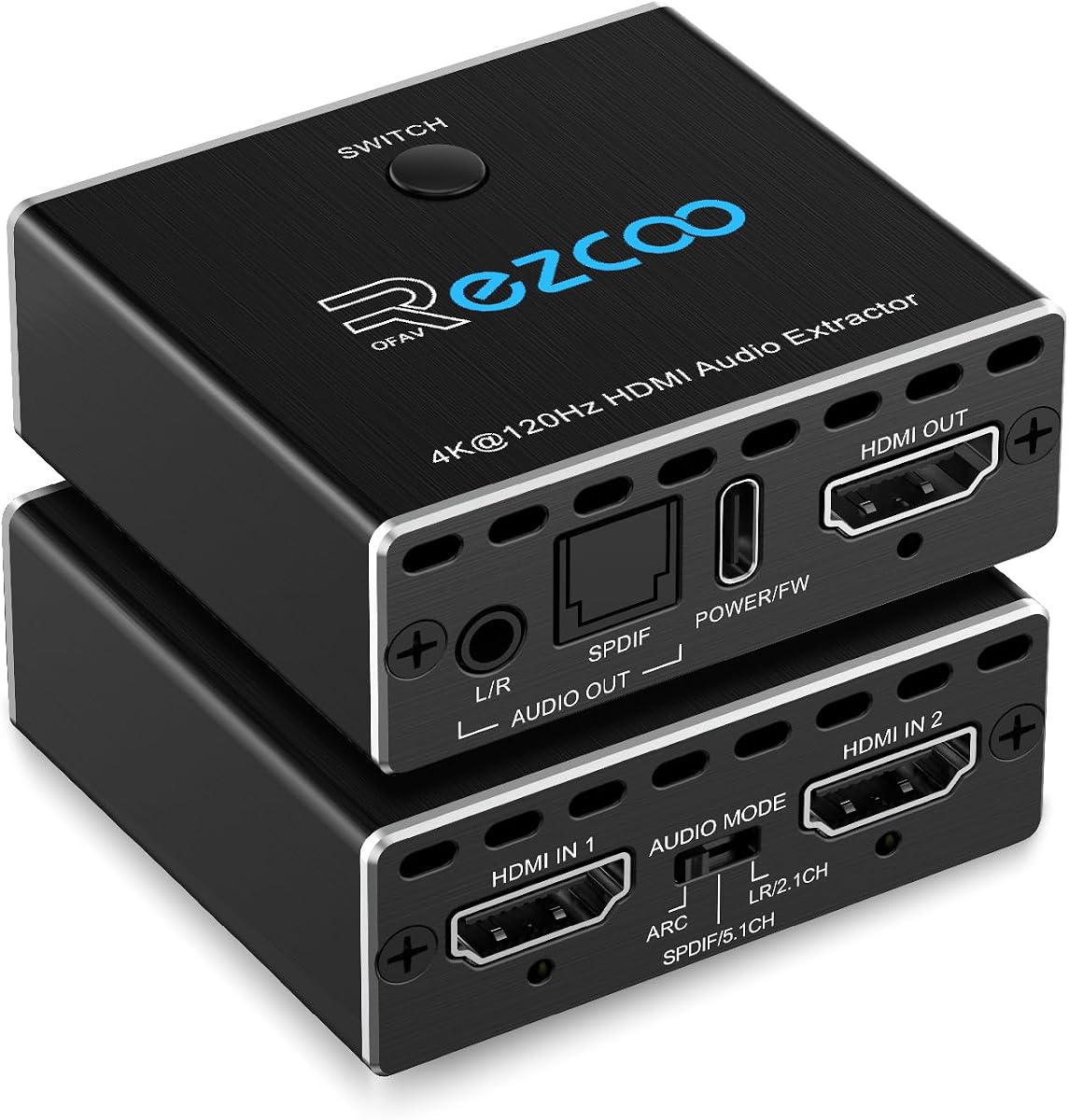
This unit functions as both an extractor and a switch allowing two sources to connect to one display. It supports 4K@120Hz and HDR formats ensuring high performance for next-gen consoles. This dual functionality reduces desk clutter.
We may earn a commission when you buy through this link, at no additional cost to you.
Key strengths include automatic switching which improves usability when swapping between devices. It handles high bandwidth HDMI 2.1 signals effectively. The Type-C power port allows for clean cable management.
Trade-offs include the lack of backward support limiting it to one display output. Users must ensure HDMI 2.1 cables are used for optimal performance. These are acceptable trade-offs for a compact all-in-one unit.
We recommend this model for users who want to consolidate their console connections. It simplifies setups without sacrificing video or audio quality.
This device combines two HDMI inputs into one allowing users to switch between sources without unplugging cables.
Support for HDMI 2.1 ensures that high-resolution and high-refresh-rate video signals are passed through without issues.
We may earn a commission when you buy through this link, at no additional cost to you.
This extractor supports 8K@60Hz video and offers three distinct operating modes for audio handling. It handles eARC inputs from modern TVs and provides optical and analog outputs. This flexibility makes it suitable for various setups.
We may earn a commission when you buy through this link, at no additional cost to you.
Strengths include the ability to downmix or pass through audio based on user needs. The device supports 24-bit color and high refresh rates. It is versatile for both HDMI sources and TV ARC connections.
Limitations include the need to manually select modes via switches which adds complexity. Users must also use specific HDMI cables for stable 8K transmission. These requirements are manageable for tech-savvy users.
We recommend this model for users needing versatility across different audio and video sources. It offers high performance at a mid-range price.
Triple operating modes allow users to choose between pass-through or downmixing based on their audio system needs.
Support for 8K@60Hz ensures this unit will remain relevant as higher resolution content becomes available.
We may earn a commission when you buy through this link, at no additional cost to you.
This extractor offers a lightweight solution for basic audio extraction needs. It supports 4Kx2K at 30Hz and includes 3D compatibility. The compact size makes it easy to hide behind devices.
We may earn a commission when you buy through this link, at no additional cost to you.
Strengths include its affordability and simple plug-and-play setup. It includes a USB power cable and audio cable in the package. This makes it ready to use right out of the box.
Limitations include a limit of 30Hz at 4K resolution and no ARC support. These constraints make it better suited for static displays than gaming. However these issues are minor for casual users.
We recommend this model for users who need a basic and portable audio extractor. It provides essential functionality without complexity.
The lightweight design makes it easy to transport and hide behind televisions for a clean setup.
Including a USB cable and audio cable ensures you have everything needed to start using the device immediately.
We may earn a commission when you buy through this link, at no additional cost to you.
Selecting the right extractor depends on your specific audio needs and video resolution requirements.
Ensure the extractor supports your source resolution such as 4K@60Hz or 8K. Mismatched bandwidth can lead to signal loss or flickering.
Choose a unit that matches or exceeds your monitor or TV capabilities for stable performance.
Check if the device supports the audio formats you use like Dolby Digital or DTS. Analog outputs usually downmix to stereo PCM.
Select a unit that handles your desired surround sound formats for true audio separation.
ARC support allows audio extraction from TV HDMI ports. eARC offers higher bandwidth for lossless audio from streaming apps.
If you need to pull audio from your TV apps prioritize models with ARC or eARC enabled.
Most extractors require external power via USB. Ensure your setup has a free port to power the device.
Check included cables like HDMI or optical to avoid extra purchases for a complete setup.
Metal housings offer better durability and heat management for long usage. Plastic units may overheat during extended sessions.
Prioritize metal enclosures for reliability especially if using the extractor daily.
Confirm the extractor has the outputs you need such as optical, coaxial, or analog stereo. Some models lack specific digital ports.
Match the outputs to your speakers or receivers to ensure compatibility without adapters.
Consider HDMI 2.1 support for future 8K or high refresh rate needs. Older HDMI versions may limit upcoming upgrades.
Investing in newer standards ensures the device remains useful as content evolves.
Look for brands offering warranties and technical support for troubleshooting. User reviews provide insight into real-world reliability.
A trusted brand ensures access to help if the device fails or has compatibility issues.
Connect the HDMI input to your source device like a console or Blu-ray player. Then connect the HDMI output to your display or TV to pass video through.
Plug in the power supply using the included USB cable. Ensure the device is powered on before testing audio to avoid detection issues.
Clean the ports gently with a dry cloth to prevent dust buildup. Avoid exposing the unit to extreme heat or humidity to maintain stability.
Most extractors work with any TV that has an HDMI port. However for ARC models you must ensure your TV supports ARC or eARC specifically. Check your manual for these features before purchasing.
Many modern TVs lack external audio output ports like optical or analog. An extractor separates the audio signal allowing you to connect external speakers or soundbars for better sound.
A high-quality extractor should not affect video quality. Look for pass-through support that matches your source resolution to avoid signal degradation or color issues.
Yes extractors are fully compatible with modern gaming consoles like PS5 or Xbox Series X. They help route audio to external systems without affecting game visuals.
Optical outputs often support surround formats like Dolby Digital. Analog outputs usually downmix to stereo PCM. Check the specs if you need full surround sound.
ARC allows basic audio return while eARC supports higher bandwidth and lossless formats. Choose eARC if you want high-resolution audio from streaming apps.
No these devices are designed to be plug and play. They require no software installation on your computer or console.
Most extractors require external power for stable operation. Check if the unit has a USB power port. If your source device cannot supply enough power use a USB adapter.
Choosing the right HDMI audio extractor enhances your home entertainment experience significantly. Our top picks cover various needs from budget options to premium 8K capable units.
Prioritize video bandwidth and ARC support based on your current devices. A future-proof model ensures you can upgrade your display without replacing your audio setup.
Always verify current prices and availability before purchasing as they fluctuate. Use this guide to find the best fit for your specific home theater needs.